<?xml version="1.0" encoding="utf-8"?><feed xmlns="http://www.w3.org/2005/Atom" ><generator uri="https://jekyllrb.com/" version="3.10.0">Jekyll</generator><link href="https://proplayerplayz.github.io/feed.xml" rel="self" type="application/atom+xml" /><link href="https://proplayerplayz.github.io/" rel="alternate" type="text/html" /><updated>2025-12-07T20:03:47+00:00</updated><id>https://proplayerplayz.github.io/feed.xml</id><title type="html">Sakthi’s Blog</title><subtitle>A Blog where I upload my Business Analytics Projects</subtitle><author><name>Sakthi Swaroopan S</name></author><entry><title type="html">How Amazon Runs on MIS: The Data Systems, Architecture, and Algorithms Behind the World’s Most Efficient Company</title><link href="https://proplayerplayz.github.io/2025/12/07/mis-amazon.html" rel="alternate" type="text/html" title="How Amazon Runs on MIS: The Data Systems, Architecture, and Algorithms Behind the World’s Most Efficient Company" /><published>2025-12-07T00:00:00+00:00</published><updated>2025-12-07T00:00:00+00:00</updated><id>https://proplayerplayz.github.io/2025/12/07/mis-amazon</id><content type="html" xml:base="https://proplayerplayz.github.io/2025/12/07/mis-amazon.html"><![CDATA[<p>While working on another project recently, I ended up reading about how Amazon actually works internally — and it quickly became obvious that Amazon isn’t just an e-commerce platform.<br />
It’s a <em>gigantic, integrated Management Information System (MIS)</em> that connects customers, warehouses, inventory, pricing, logistics, forecasting, and even executive decisions through data pipelines and algorithms.</p>

<p>The deeper you go, the more it becomes clear:</p>
<blockquote>
  <p><strong>Amazon’s competitive advantage is an MIS advantage.</strong></p>
</blockquote>

<p>This blog breaks down the MIS architecture powering Amazon — from real-time transaction systems to massive data lakes and predictive decision-support engines.</p>

<hr />

<h2 id="1-amazons-mis-architecture-a-layered-system">1. Amazon’s MIS Architecture: A Layered System</h2>

<p>If we map Amazon’s internal technology to the MIS framework we study in class, it looks like this:</p>

<p><img src="/assets/mis-2/1.jpg" alt="How All These Systems Connect: A Simplified Data Flow" /></p>

<p>Amazon didn’t design these layers academically — they evolved naturally out of scale.<br />
But the match is nearly perfect.</p>

<hr />

<h2 id="2-transaction-processing-systems-tps-the-real-time-engine">2. Transaction Processing Systems (TPS): The Real-Time Engine</h2>

<p>Amazon runs millions of TPS events per minute:</p>

<ul>
  <li>Every product search</li>
  <li>Every page view</li>
  <li>Every “Add to Cart”</li>
  <li>Every barcode scan in a warehouse</li>
  <li>Every inventory movement</li>
  <li>Every delivery update</li>
</ul>

<p>These TPS events hit high-speed databases like:</p>

<ul>
  <li><strong>Amazon DynamoDB</strong> (for low-latency key-value reads)</li>
  <li><strong>Aurora &amp; RDS</strong> (for transactional SQL)</li>
  <li><strong>Amazon Kinesis</strong> (for high-volume event streams)</li>
</ul>

<p>TPS is the foundation because <strong>everything Amazon does is time-sensitive</strong>:<br />
If a warehouse worker picks an item, inventory updates instantly; if a user searches for a product, recommendations update instantly.</p>

<p>🟡 <em>MIS takeaway:</em><br />
TPS enables Amazon’s MIS to have real-time accuracy, not daily or weekly reporting.</p>

<hr />

<h2 id="3-the-data-backbone-s3-data-lake--redshift-warehouse">3. The Data Backbone: S3 Data Lake + Redshift Warehouse</h2>

<p>Behind the scenes, Amazon has a <strong>two-part analytics backbone</strong>:</p>

<h3 id="a-data-lake-amazon-s3"><strong>A) Data Lake (Amazon S3)</strong></h3>
<p>Stores raw logs from:</p>

<ul>
  <li>Website clicks</li>
  <li>Order histories</li>
  <li>Warehouse scanner logs</li>
  <li>IoT sensors on robots</li>
  <li>Delivery GPS data</li>
  <li>Supplier feeds</li>
  <li>Customer service transcripts</li>
</ul>

<p>This is petabyte-scale data.</p>

<h3 id="b-data-warehouse-amazon-redshift"><strong>B) Data Warehouse (Amazon Redshift)</strong></h3>
<p>Redshift performs:</p>

<ul>
  <li>Sales analysis</li>
  <li>Forecasting</li>
  <li>Inventory planning</li>
  <li>Profitability reporting</li>
  <li>Cohort analysis</li>
  <li>Pricing optimization</li>
</ul>

<p>The data lake → warehouse pipeline uses:</p>

<ul>
  <li>AWS Glue (ETL)</li>
  <li>Athena (interactive querying)</li>
  <li>EMR (big data processing)</li>
</ul>

<p>🟡 <em>MIS takeaway:</em><br />
This architecture gives Amazon a single source of truth for managerial reporting and decision-making.</p>

<hr />

<h2 id="4-mis-layer-dashboards-monitoring-and-operational-control">4. MIS Layer: Dashboards, Monitoring and Operational Control</h2>

<p>Once data is processed, it flows into Amazon’s MIS dashboards.</p>

<p>These dashboards are used by:</p>

<ul>
  <li>Category managers</li>
  <li>Supply chain planners</li>
  <li>Inbound/outbound operations teams</li>
  <li>Delivery station managers</li>
  <li>Finance</li>
  <li>Vendor managers</li>
  <li>Marketplace teams</li>
</ul>

<p>Examples of MIS reports:</p>

<h3 id="1-inventory-health-dashboards"><strong>1. Inventory Health Dashboards</strong></h3>
<p>Shows:</p>
<ul>
  <li>Sell-through rate</li>
  <li>Excess inventory</li>
  <li>Out-of-stock risk</li>
  <li>Aging inventory</li>
  <li>Safety stock levels</li>
</ul>

<h3 id="2-supply-chain--fulfillment-dashboards"><strong>2. Supply Chain &amp; Fulfillment Dashboards</strong></h3>
<p>Shows:</p>
<ul>
  <li>Picking/packing time</li>
  <li>Dock-to-stock metrics</li>
  <li>SLA compliance</li>
  <li>Throughput per shift</li>
  <li>Bottleneck alerts</li>
</ul>

<h3 id="3-customer-experience-dashboards"><strong>3. Customer Experience Dashboards</strong></h3>
<p>Shows:</p>
<ul>
  <li>Late delivery rates</li>
  <li>Cancellation rates</li>
  <li>Return rates</li>
  <li>Page load performance</li>
  <li>Recommendation success rate</li>
</ul>

<p>These dashboards are updated <strong>hourly or even real-time</strong>, not monthly like traditional MIS.</p>

<p>🟡 <em>MIS takeaway:</em><br />
Amazon’s MIS is a <strong>live operational cockpit</strong>, not a passive reporting system.</p>

<hr />

<h2 id="5-decision-support-systems-dss-forecasting-algorithms--optimization">5. Decision Support Systems (DSS): Forecasting, Algorithms &amp; Optimization</h2>

<p>Amazon’s DSS layer is where the intelligence happens.</p>

<p>This includes:</p>

<h3 id="1-demand-forecasting-systems"><strong>1. Demand Forecasting Systems</strong></h3>
<ul>
  <li>Forecasts demand at the SKU × region × week level</li>
  <li>Uses historical sales, seasonality, pricing, competitor trends</li>
</ul>

<p>Amazon built custom forecasting systems internally + on AWS.</p>

<h3 id="2-inventory-placement-algorithms"><strong>2. Inventory Placement Algorithms</strong></h3>
<p>Predict where to store each product BEFORE it’s even ordered.</p>

<p>This is why Amazon can ship so fast — items are pre-positioned near likely buyers.</p>

<h3 id="3-dynamic-pricing-engine"><strong>3. Dynamic Pricing Engine</strong></h3>
<p>Prices change based on:</p>
<ul>
  <li>Competitor prices</li>
  <li>Inventory levels</li>
  <li>Conversion probability</li>
  <li>Sales velocity</li>
  <li>Time-of-day patterns</li>
</ul>

<h3 id="4-route-optimization-for-delivery"><strong>4. Route Optimization for Delivery</strong></h3>
<p>Routing algorithms evaluate:</p>
<ul>
  <li>Traffic</li>
  <li>Weather</li>
  <li>Driver capacity</li>
  <li>Delivery density</li>
</ul>

<p>Amazon uses:</p>
<ul>
  <li><strong>Amazon Logistics Routing Engine</strong></li>
  <li><strong>Map-based ML models</strong></li>
  <li><strong>DSP (delivery service provider) optimization tools</strong></li>
</ul>

<p>🟡 <em>MIS takeaway:</em><br />
DSS turns raw data into optimized decisions.<br />
This is the “brains” of Amazon.</p>

<hr />

<h2 id="6-executive-support-systems-ess-strategic-mis-at-scale">6. Executive Support Systems (ESS): Strategic MIS at Scale</h2>

<p>At the top level, Amazon’s senior leadership uses MIS outputs to make:</p>

<ul>
  <li>New market entry decisions</li>
  <li>Prime pricing changes</li>
  <li>Infrastructure investment choices</li>
  <li>Vendor negotiations</li>
  <li>Long-term supply chain strategy</li>
</ul>

<p>Key ESS tools include:</p>

<ul>
  <li>Enterprise financial dashboards</li>
  <li>Corporate BI platforms</li>
  <li>Multi-year trend analysis</li>
  <li>Customer lifetime value models</li>
  <li>High-level cohort insights</li>
</ul>

<p>ESS gives a bird’s-eye view of the whole ecosystem.</p>

<p>🟡 <em>MIS takeaway:</em><br />
Amazon’s “Day 1” philosophy is driven by data — ESS ensures leaders have high-quality information to stay agile.</p>

<hr />

<h2 id="7-how-all-these-systems-connect-a-simplified-data-flow">7. How All These Systems Connect: A Simplified Data Flow</h2>

<p><img src="/assets/mis-2/2.jpg" alt="How All These Systems Connect: A Simplified Data Flow" /></p>

<p>Every part of Amazon — from a warehouse picker to the CEO — is looking at different layers of the <strong>same integrated MIS ecosystem</strong>.</p>

<hr />

<h2 id="8-why-amazons-mis-gives-it-an-unfair-competitive-advantage">8. Why Amazon’s MIS Gives It an Unfair Competitive Advantage</h2>

<h3 id="1️⃣-speed"><strong>1️⃣ Speed</strong></h3>
<p>Decisions are made based on up-to-the-minute data.</p>

<h3 id="2️⃣-predictive-intelligence"><strong>2️⃣ Predictive Intelligence</strong></h3>
<p>Amazon knows what customers will want <em>before</em> they want it.</p>

<h3 id="3️⃣-scale"><strong>3️⃣ Scale</strong></h3>
<p>Systems are built on AWS, meaning infinite scaling.</p>

<h3 id="4️⃣-integration"><strong>4️⃣ Integration</strong></h3>
<p>Every part of the value chain talks to every other part.</p>

<h3 id="5️⃣-automation"><strong>5️⃣ Automation</strong></h3>
<p>Humans don’t decide most operational tasks — algorithms do.</p>

<p>This is MIS at its absolute maximum potential.</p>

<hr />

<h2 id="9-final-thoughts-amazon-as-an-mis-success-story">9. Final Thoughts: Amazon as an MIS Success Story</h2>

<p>If you strip away the brand, the website, the fast delivery and Prime…</p>

<p><strong>Amazon is essentially a giant MIS.</strong><br />
Every competitive edge it has — speed, accuracy, customer obsession, low prices — is enabled by information systems and real-time decision architecture.</p>

<p>For students, analysts, or anyone in business/tech, studying Amazon gives us the clearest example of what a modern MIS can look like when it is:</p>

<ul>
  <li>Vast in scale</li>
  <li>Deeply integrated</li>
  <li>Real-time</li>
  <li>Predictive</li>
  <li>Automated</li>
  <li>Relentlessly optimized</li>
</ul>

<p>And that’s why Amazon remains one of the best MIS case studies of the 21st century.</p>]]></content><author><name>Sakthi Swaroopan S</name></author><category term="Other" /><summary type="html"><![CDATA[While working on another project recently, I ended up reading about how Amazon actually works internally — and it quickly became obvious that Amazon isn’t just an e-commerce platform. It’s a gigantic, integrated Management Information System (MIS) that connects customers, warehouses, inventory, pricing, logistics, forecasting, and even executive decisions through data pipelines and algorithms.]]></summary></entry><entry><title type="html">Virtual Organization and the Flattening of Management: What MIS Enables</title><link href="https://proplayerplayz.github.io/2025/11/02/mis-virtual-organization.html" rel="alternate" type="text/html" title="Virtual Organization and the Flattening of Management: What MIS Enables" /><published>2025-11-02T00:00:00+00:00</published><updated>2025-11-02T00:00:00+00:00</updated><id>https://proplayerplayz.github.io/2025/11/02/mis-virtual-organization</id><content type="html" xml:base="https://proplayerplayz.github.io/2025/11/02/mis-virtual-organization.html"><![CDATA[<p>A Blog post on how IT enables decentralized decision making, and post pandemic collaboration models</p>
<h2 id="introduction">Introduction</h2>
<ul>
  <li>The 21st-century firm is no longer confined to glass offices and fixed hierarchies.</li>
  <li>Cloud collaboration tools, real-time dashboards, and AI-driven MIS have <strong>flattened organizations</strong> — pushing decision-making to the edge.</li>
  <li>Employees now manage data, processes, and innovation directly through systems — not through layers of supervision.</li>
  <li>According to <em>Laudon &amp; Laudon’s MIS framework</em>, IT reduces <strong>transaction and agency costs</strong>, enabling organizations to operate with fewer management layers and greater autonomy.</li>
</ul>

<h2 id="the-concept-of-the-flattened-organization">The Concept of the “Flattened” Organization</h2>
<ul>
  <li><strong>Flattening</strong> refers to reducing the vertical hierarchy — fewer managers, broader spans of control.</li>
  <li>MIS automates information flow → fewer intermediaries needed to gather and report data.</li>
  <li>With digital dashboards, analytics, and collaborative tools, <strong>frontline employees</strong> can access the same insights executives see.</li>
  <li>Example: In GitLab’s all-remote setup, developers, designers, and marketers access shared dashboards and OKR boards — no need to “wait for approval loops.”</li>
  <li>This structure promotes agility, transparency, and accountability.</li>
</ul>

<p><img src="https://www.mbaknol.com/wp-content/uploads/2018/07/tall-flat-structure-mbaknol.jpg.webp" alt="Difference Between Tall and Flat Organizational Structure - MBA Knowledge  Base" /></p>

<h2 id="virtual-organizations--beyond-geography">Virtual Organizations – Beyond Geography</h2>
<ul>
  <li>A <strong>virtual organization</strong> operates through digital linkages rather than physical proximity.</li>
  <li>It’s a network of individuals and teams connected through MIS platforms — Slack, Asana, Jira, Notion, or custom ERP dashboards.</li>
  <li>Virtual setups allow:
    <ul>
      <li>Cross-time-zone workflows</li>
      <li>Access to global talent</li>
      <li>Real-time updates and version control</li>
    </ul>
  </li>
  <li>MIS integrates <strong>communication (Zoom, Teams)</strong> + <strong>coordination (Asana, Trello)</strong> + <strong>data (PowerBI, Tableau)</strong> to maintain organizational coherence.</li>
</ul>

<p><strong>Example:</strong></p>
<ul>
  <li><em>GitLab</em>, a fully remote company with 2,000+ employees across 60+ countries, relies on its <strong>open-source MIS stack</strong> — issue trackers, analytics boards, and handbooks — to function without any offices.</li>
  <li><em>Asana</em> enables similar cross-time-zone task visibility with analytics integrations that feed directly into management dashboards.</li>
</ul>

<h2 id="the-role-of-mis-in-enabling-decentralized-decision-making">The Role of MIS in Enabling Decentralized Decision-Making</h2>
<ul>
  <li>MIS serves as the <strong>digital nervous system</strong> of modern firms.
    <ul>
      <li>It provides:</li>
      <li><strong>Shared databases</strong> → everyone accesses current, accurate data.</li>
      <li><strong>Real-time analytics dashboards</strong> → decision support for all levels.</li>
      <li><strong>Workflow automation</strong> → reduced dependency on manual reporting.</li>
    </ul>
  </li>
  <li>As a result:
    <ul>
      <li>Managers act as <strong>facilitators</strong>, not controllers.</li>
      <li>Employees take initiative using transparent data insights.</li>
      <li>Decisions happen <strong>closer to the problem source</strong>.</li>
    </ul>
  </li>
</ul>

<p><strong>Example Systems:</strong></p>
<ul>
  <li><strong>ERP (SAP, Odoo)</strong> – integrates departments for transparency.</li>
  <li><strong>BI Tools (Power BI, Tableau)</strong> – democratize analytics.</li>
  <li><strong>Project MIS (Asana, ClickUp)</strong> – merge operations and metrics.</li>
</ul>

<h2 id="challenges-and-counterpoints"><strong>Challenges and Counterpoints</strong></h2>
<ul>
  <li><strong>Information Overload:</strong> Too much access can confuse priorities.</li>
  <li><strong>Cultural Gaps:</strong> Flat, virtual systems require strong digital etiquette.</li>
  <li><strong>Security Risks:</strong> Decentralized systems widen the attack surface.</li>
  <li><strong>Coordination Complexity:</strong> Without structured roles, accountability may blur.</li>
</ul>

<p>Organizations need <strong>governance frameworks</strong> within MIS to balance openness with control.</p>

<h2 id="leadership-in-the-age-of-flattened-hierarchies"><strong>Leadership in the Age of Flattened Hierarchies</strong></h2>

<ul>
  <li>Leaders evolve from “commanders” to <strong>coaches and connectors</strong>.</li>
  <li>Key leadership traits in virtual organizations:
    <ul>
      <li>Digital literacy &amp; tool fluency</li>
      <li>Data-driven empathy (understanding through analytics, not assumptions)</li>
      <li>Transparency &amp; trust-based accountability</li>
      <li>Comfort with asynchronous communication</li>
    </ul>
  </li>
  <li>MIS helps track performance objectively — but leadership ensures <strong>meaning and motivation</strong> stay human.</li>
</ul>

<blockquote>
  <p>“The best leaders today manage <em>through information</em>, not through proximity.”</p>
</blockquote>

<h2 id="conclusion--the-future-organization-is-flat-fast-and-fluid"><strong>Conclusion – The Future Organization Is Flat, Fast, and Fluid</strong></h2>
<ul>
  <li>MIS + Cloud + AI have made <strong>geography irrelevant</strong> and <strong>hierarchies optional</strong>.</li>
  <li>Tomorrow’s firms will function as living ecosystems — nodes of collaboration powered by information systems.</li>
  <li>The challenge is not implementing more technology, but learning to <strong>lead effectively through it</strong>.</li>
</ul>

<p><img src="https://img-s-msn-com.akamaized.net/tenant/amp/entityid/AA1Fssof.img?w=768&amp;h=466&amp;m=6" alt="What If Earth Developed a Brain?" /></p>]]></content><author><name>Sakthi Swaroopan S</name></author><category term="Other" /><summary type="html"><![CDATA[A Blog post on how IT enables decentralized decision making, and post pandemic collaboration models Introduction The 21st-century firm is no longer confined to glass offices and fixed hierarchies. Cloud collaboration tools, real-time dashboards, and AI-driven MIS have flattened organizations — pushing decision-making to the edge. Employees now manage data, processes, and innovation directly through systems — not through layers of supervision. According to Laudon &amp; Laudon’s MIS framework, IT reduces transaction and agency costs, enabling organizations to operate with fewer management layers and greater autonomy.]]></summary></entry><entry><title type="html">Sustainability, Leadership &amp;amp; Performance: 5‑Year Analytics</title><link href="https://proplayerplayz.github.io/2025/09/14/sustainability-analysis-project.html" rel="alternate" type="text/html" title="Sustainability, Leadership &amp;amp; Performance: 5‑Year Analytics" /><published>2025-09-14T00:00:00+00:00</published><updated>2025-09-14T00:00:00+00:00</updated><id>https://proplayerplayz.github.io/2025/09/14/sustainability-analysis-project</id><content type="html" xml:base="https://proplayerplayz.github.io/2025/09/14/sustainability-analysis-project.html"><![CDATA[<p>Sakthi Swaroopan S - CB.BU.P2ASB25147</p>

<h1 id="0-setup">0) Setup</h1>

<pre><code class="language-r"># install.packages(c("readxl","dplyr","magrittr","factoextra","rattle","DT","psych","tibble","tidyr"))


library(readxl)
library(dplyr)
library(magrittr)
library(factoextra)
library(rattle)
library(DT)
library(psych)
library(tibble)
library(tidyr)


set.seed(42)


# ---- Paths ----
DATA_PATH &lt;- "/ESG_Dataset_Sakthi.xlsx"
SHEET_NAME &lt;- "Sheet1"
</code></pre>

<h1 id="1-importing-the-data">1) Importing the data</h1>

<p>Data was collected through the annual reports sourced from NSE.</p>

<pre><code class="language-r">raw &lt;- read_excel(DATA_PATH, sheet = SHEET_NAME) %&gt;%
janitor::clean_names() # using janitor fully qualified (not attaching)


# Expected columns after clean_names():
# company_name, year, industry_type, ceo_name, ceo_gender,
# carbon_emissions, energy_consumption, employee_turnover, roe, roa
</code></pre>

<h1 id="2-exploratory-analysis">2) Exploratory analysis</h1>

<pre><code class="language-r"># Structure and a peek
str(raw)
</code></pre>

<pre><code>## tibble [48 × 11] (S3: tbl_df/tbl/data.frame)
##  $ company_name      : chr [1:48] "Sona BLW Percision forgings ltd" "Sona BLW Percision forgings ltd" "Sona BLW Percision forgings ltd" "Sona BLW Percision forgings ltd" ...
##  $ year              : num [1:48] 2021 2022 2023 2024 2025 ...
##  $ carbon_emissions  : chr [1:48] "32756" "40330" "48468" "58317" ...
##  $ energy_consumption: chr [1:48] "41800.07" "52308.14" "311100" "358157" ...
##  $ employee_turnover : chr [1:48] "7.6499999999999999E-2" "0.11" "0.16" "0.13" ...
##  $ roa               : num [1:48] 0.1065 0.141 0.1303 0.1351 0.0941 ...
##  $ roe               : num [1:48] 0.153 0.179 0.172 0.188 0.107 ...
##  $ industry_type     : chr [1:48] "Automotive" "Automotive" "Automotive" "Automotive" ...
##  $ location          : chr [1:48] "Haryana" "Haryana" "Haryana" "Haryana" ...
##  $ ceo_name          : chr [1:48] "Vivek Vikram Singh" "Vivek Vikram Singh" "Vivek Vikram Singh" "Vivek Vikram Singh" ...
##  $ ceo_gender        : chr [1:48] "Male" "Male" "Male" "Male" ...
</code></pre>

<pre><code class="language-r">DT::datatable(head(raw, 20), options = list(pageLength = 10), caption = "Raw data (first 20 rows)")
</code></pre>

<pre><code>## Error in loadNamespace(name): there is no package called 'webshot'
</code></pre>

<pre><code class="language-r"># Simple counts
raw %&gt;% count(company_name, sort = TRUE) %&gt;% DT::datatable(caption = "Rows per company")
</code></pre>

<pre><code>## Error in loadNamespace(name): there is no package called 'webshot'
</code></pre>

<pre><code class="language-r">raw %&gt;% count(year, sort = TRUE) %&gt;% DT::datatable(caption = "Rows per year")
</code></pre>

<pre><code>## Error in loadNamespace(name): there is no package called 'webshot'
</code></pre>

<ul>
  <li>
    <p>Data is uneven across companies and years; not all variables are consistently reported.</p>
  </li>
  <li>
    <p>Some firms dominate in reporting while others have sparse records.</p>
  </li>
</ul>

<h1 id="3-preprocessing-the-data">3) Pre‑processing the data</h1>

<p><strong>Rules applied</strong></p>

<ul>
  <li>
    <p>Drop rows where <strong>Energy_Consumption == “Not Reported”</strong>. This ensures comparability between the companies.</p>
  </li>
  <li>
    <p>Replace <strong>NA in Carbon_Emissions</strong> with <strong>0</strong> for non-manufacturing firms.</p>
  </li>
  <li>
    <p>Cast types for numeric columns; keep factors for categories.</p>
  </li>
  <li>
    <p>Standardizing Decimals to improve readability and consistency.</p>

    <pre><code class="language-r">df &lt;- raw %&gt;%
# Normalize text placeholders to real NAs
mutate(
energy_consumption = dplyr::na_if(energy_consumption, "Not Reported"),
carbon_emissions = dplyr::na_if(carbon_emissions, "NA")
) %&gt;%
# Coerce to appropriate types
mutate(
year = as.integer(year),
industry_type = as.factor(industry_type),
ceo_gender = factor(ceo_gender, levels = c("Male","Female","Other")),
energy_consumption = suppressWarnings(as.numeric(energy_consumption)),
carbon_emissions = suppressWarnings(as.numeric(carbon_emissions)),
employee_turnover = suppressWarnings(as.numeric(employee_turnover)),
roe = suppressWarnings(as.numeric(roe)),
roa = suppressWarnings(as.numeric(roa))
) %&gt;%
# Apply the two cleaning rules
filter(!is.na(energy_consumption)) %&gt;% # drop Not Reported rows
mutate(carbon_emissions = dplyr::coalesce(carbon_emissions, 0)) %&gt;%
mutate(across(c(carbon_emissions, energy_consumption,employee_turnover, roe, roa), ~ round(.x, 2))) %&gt;%
arrange(company_name, year)
    
    
# Quick sanity check
stopifnot(all(c("company_name","year","industry_type","ceo_gender",
"carbon_emissions","energy_consumption","employee_turnover","roe","roa") %in% names(df)))
</code></pre>
  </li>
</ul>

<h1 id="4-preview-of-data-before-analysis">4) Preview of data before analysis</h1>

<pre><code class="language-r">DT::datatable(head(df, 20), options = list(pageLength = 10), caption = "Cleaned data (first 20 rows)")
</code></pre>

<pre><code>## Error in loadNamespace(name): there is no package called 'webshot'
</code></pre>

<h1 id="5-exploratory-analysis-postclean">5) Exploratory analysis (post‑clean)</h1>

<pre><code class="language-r"># Numeric summary by year
year_summary &lt;- df %&gt;%
group_by(year) %&gt;%
summarise(
n = dplyr::n(),
mean_emissions = mean(carbon_emissions, na.rm = TRUE),
mean_energy = mean(energy_consumption, na.rm = TRUE),
mean_turnover = mean(employee_turnover, na.rm = TRUE),
mean_roe = mean(roe, na.rm = TRUE),
mean_roa = mean(roa, na.rm = TRUE)
)
DT::datatable(year_summary, caption = "Year‑wise summary")
</code></pre>

<pre><code>## Error in loadNamespace(name): there is no package called 'webshot'
</code></pre>

<pre><code class="language-r"># Correlation matrix (pooled numeric)
num_cols &lt;- c("carbon_emissions","energy_consumption","employee_turnover","roe","roa")
cor_mat &lt;- stats::cor(df[, num_cols], use = "pairwise.complete.obs")
cor_mat &lt;- round(cor_mat, 2)
cor_mat
</code></pre>

<pre><code>##                    carbon_emissions energy_consumption employee_turnover   roe   roa
## carbon_emissions               1.00              -0.15             -0.46  0.03  0.13
## energy_consumption            -0.15               1.00              0.04 -0.22 -0.14
## employee_turnover             -0.46               0.04              1.00 -0.24 -0.22
## roe                            0.03              -0.22             -0.24  1.00  0.94
## roa                            0.13              -0.14             -0.22  0.94  1.00
</code></pre>

<pre><code class="language-r"># helper function to convert psych::describe output into vertical key-value tibble
describe_long &lt;- function(x) {
  psych::describe(x) %&gt;%
    as_tibble() %&gt;%
    select(-vars, -n) %&gt;%   # drop unneeded cols (keep stats)
    pivot_longer(cols = everything(),
                 names_to = "Metric",
                 values_to = "Value")
}

# Now display each variable as vertical DT
DT::datatable(describe_long(df["carbon_emissions"]), caption = "Carbon Emissions")
</code></pre>

<pre><code>## Error in loadNamespace(name): there is no package called 'webshot'
</code></pre>

<pre><code class="language-r">DT::datatable(describe_long(df["energy_consumption"]), caption = "Energy Consumption")
</code></pre>

<pre><code>## Error in loadNamespace(name): there is no package called 'webshot'
</code></pre>

<pre><code class="language-r">DT::datatable(describe_long(df["employee_turnover"]), caption = "Employee Turnover")
</code></pre>

<pre><code>## Error in loadNamespace(name): there is no package called 'webshot'
</code></pre>

<pre><code class="language-r">DT::datatable(describe_long(df["roe"]), caption = "ROE")
</code></pre>

<pre><code>## Error in loadNamespace(name): there is no package called 'webshot'
</code></pre>

<pre><code class="language-r">DT::datatable(describe_long(df["roa"]), caption = "ROA")
</code></pre>

<pre><code>## Error in loadNamespace(name): there is no package called 'webshot'
</code></pre>

<ul>
  <li>
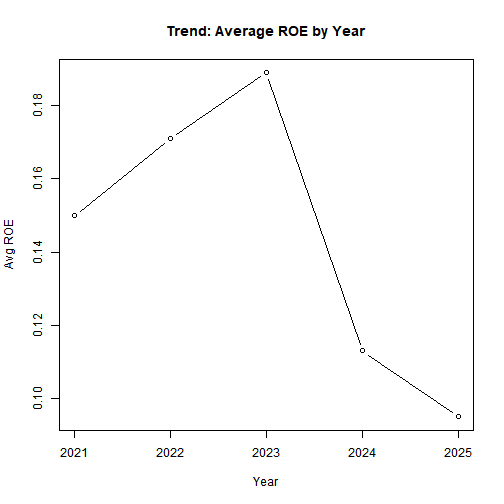
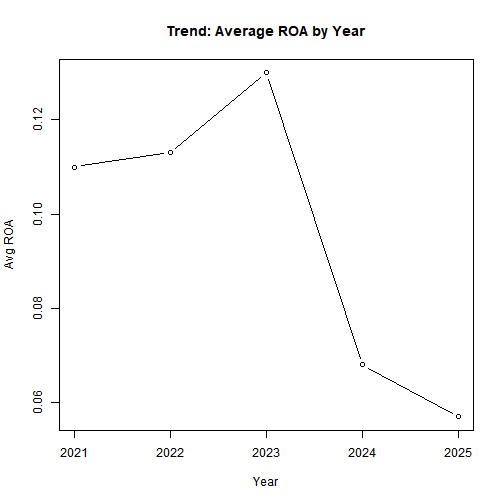
    <p>Average ROE and ROA vary significantly year to year.</p>
  </li>
  <li>
    <p>Turnover shows an overall negative correlation with profitability</p>
  </li>
</ul>

<!-- -->

<ul>
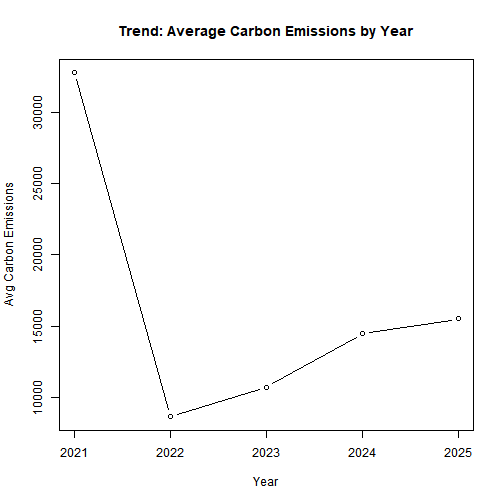
  <li>Energy consumption and emissions remain volatile, without a steady downward trend.</li>
</ul>

<h1 id="6-analysis">6) Analysis</h1>

<h2 id="61-company-performance-snapshot">6.1) Company Performance Snapshot</h2>

<pre><code class="language-r">company_summary &lt;- df %&gt;%
  group_by(company_name) %&gt;%
  summarise(
    avg_emissions   = mean(carbon_emissions, na.rm = TRUE),
    avg_energy      = mean(energy_consumption, na.rm = TRUE),
    avg_turnover    = mean(employee_turnover, na.rm = TRUE),
    avg_roe         = mean(roe, na.rm = TRUE),
    avg_roa         = mean(roa, na.rm = TRUE),
    .groups = "drop"
  ) %&gt;%
  arrange(desc(avg_roe))

DT::datatable(
  company_summary,
  caption = "5-Year Company Performance Snapshot (Averages)",
  options = list(pageLength = 10)
)
</code></pre>

<pre><code>## Error in loadNamespace(name): there is no package called 'webshot'
</code></pre>

<p>Some firms balance profitability with efficiency, while others underperform despite high energy/emissions.</p>

<h2 id="62-year-over-year-trends">6.2) Year-over-year Trends</h2>

<pre><code class="language-r"># Recompute to keep the section self-contained
yoy &lt;- df %&gt;%
  group_by(year) %&gt;%
  summarise(
    mean_emissions = mean(carbon_emissions, na.rm = TRUE),
    mean_energy    = mean(energy_consumption, na.rm = TRUE),
    mean_turnover  = mean(employee_turnover, na.rm = TRUE),
    mean_roe       = mean(roe, na.rm = TRUE),
    mean_roa       = mean(roa, na.rm = TRUE),
    .groups = "drop"
  ) %&gt;%
  arrange(year)

DT::datatable(
  yoy,
  caption = "Year-wise Averages (Sustainability &amp; Profitability)"
)
</code></pre>

<pre><code>## Error in loadNamespace(name): there is no package called 'webshot'
</code></pre>

<pre><code class="language-r"># Emissions trend
plot(
  yoy$year, yoy$mean_emissions, type = "b",
  xlab = "Year", ylab = "Avg Carbon Emissions",
  main = "Trend: Average Carbon Emissions by Year"
)
</code></pre>

<p><img src="/assets/sustainability-analysis-project/year_trend-1.png" alt="plot of chunk year_trend" /></p>

<pre><code class="language-r"># ROE trend
plot(
  yoy$year, yoy$mean_roe, type = "b",
  xlab = "Year", ylab = "Avg ROE",
  main = "Trend: Average ROE by Year"
)
</code></pre>

<p><img src="/assets/sustainability-analysis-project/year_trend-2.png" alt="plot of chunk year_trend" /></p>

<pre><code class="language-r"># ROA trend
plot(
  yoy$year, yoy$mean_roa, type = "b",
  xlab = "Year", ylab = "Avg ROA",
  main = "Trend: Average ROA by Year"
)
</code></pre>

<p><img src="/assets/sustainability-analysis-project/year_trend-3.png" alt="plot of chunk year_trend" /></p>

<p>Modest improvement in profitability, but sustainability indicators (emissions, energy) do not show consistent decline.</p>

<h2 id="63-comparative-plots">6.3) Comparative Plots</h2>

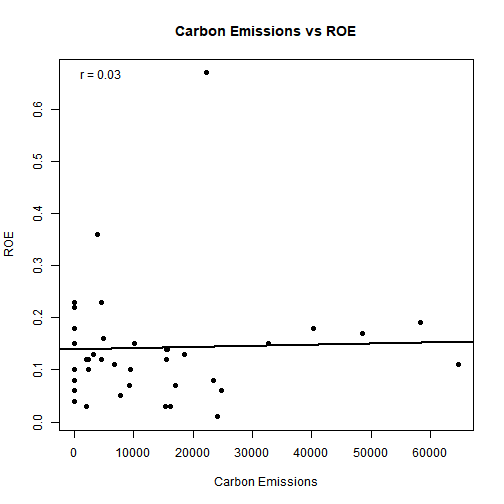
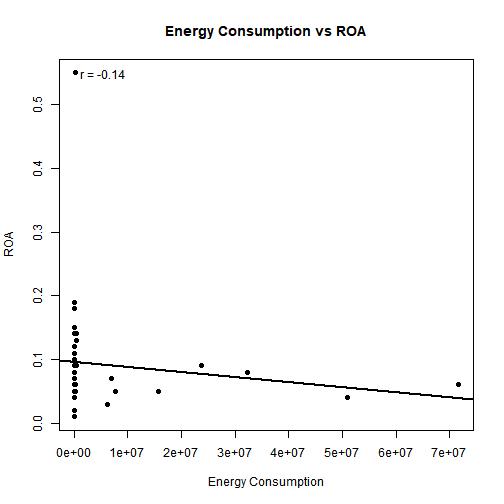
<pre><code class="language-r"># Helper to draw scatter + OLS line + correlation 
make_scatter &lt;- function(x, y, xlab, ylab, title) {
  ok &lt;- is.finite(x) &amp; is.finite(y)
  plot(x[ok], y[ok],
       xlab = xlab, ylab = ylab,
       main = title, pch = 19)
  # OLS line
  fit &lt;- stats::lm(y[ok] ~ x[ok])
  abline(fit, lwd = 2)
  # Pearson correlation
  r &lt;- stats::cor(x[ok], y[ok], method = "pearson")
  legend("topleft", bty = "n",
         legend = paste0("r = ", round(r, 2)))
}

# Emissions vs ROE
make_scatter(
  x = df$carbon_emissions, y = df$roe,
  xlab = "Carbon Emissions", ylab = "ROE",
  title = "Carbon Emissions vs ROE"
)
</code></pre>

<p><img src="/assets/sustainability-analysis-project/comparative_plots-1.png" alt="plot of chunk comparative_plots" /></p>

<pre><code class="language-r"># Energy vs ROA
make_scatter(
  x = df$energy_consumption, y = df$roa,
  xlab = "Energy Consumption", ylab = "ROA",
  title = "Energy Consumption vs ROA"
)
</code></pre>

<p><img src="/assets/sustainability-analysis-project/comparative_plots-2.png" alt="plot of chunk comparative_plots" /></p>

<pre><code class="language-r"># Turnover vs ROE
make_scatter(
  x = df$employee_turnover, y = df$roe,
  xlab = "Employee Turnover", ylab = "ROE",
  title = "Employee Turnover vs ROE"
)
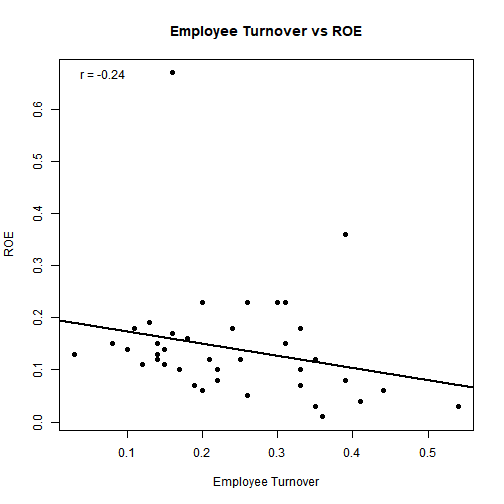
</code></pre>

<p><img src="/assets/sustainability-analysis-project/comparative_plots-3.png" alt="plot of chunk comparative_plots" /></p>

<ul>
  <li>
    <p>Negative relationship between turnover and ROE is evident.</p>
  </li>
  <li>
    <p>Emissions and energy show a slight negative relationship with performance.</p>
  </li>
</ul>

<h2 id="64-clustering">6.4) Clustering</h2>

<pre><code class="language-r">clust_df &lt;- df %&gt;%
  group_by(company_name, industry_type) %&gt;%
  summarise(
    carbon_emissions   = mean(carbon_emissions,   na.rm = TRUE),
    energy_consumption = mean(energy_consumption, na.rm = TRUE),
    employee_turnover  = mean(employee_turnover,  na.rm = TRUE),
    roe                = mean(roe,                na.rm = TRUE),
    roa                = mean(roa,                na.rm = TRUE),
    .groups = "drop"
  )

# Variables used for clustering (inputs)
vars_used &lt;- c("carbon_emissions", "energy_consumption",
               "employee_turnover", "roe", "roa")
DT::datatable(
  tibble::tibble(Variables_Used = vars_used),
  caption = "Variables used for clustering (company-level averages)"
)
</code></pre>

<pre><code>## Error in loadNamespace(name): there is no package called 'webshot'
</code></pre>

<pre><code class="language-r"># Prepare numeric matrix and scale
X &lt;- clust_df %&gt;% dplyr::select(all_of(vars_used)) %&gt;% as.data.frame()
X_scaled &lt;- scale(X)

# choose K (WSS / Silhouette)
factoextra::fviz_nbclust(X_scaled, kmeans, method = "wss", k.max = 8)
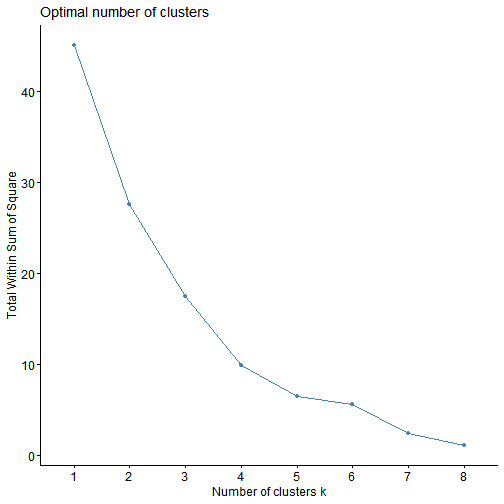
</code></pre>

<p><img src="/assets/sustainability-analysis-project/clustering-1.png" alt="plot of chunk clustering" /></p>

<pre><code class="language-r">factoextra::fviz_nbclust(X_scaled, kmeans, method = "silhouette", k.max = 8)
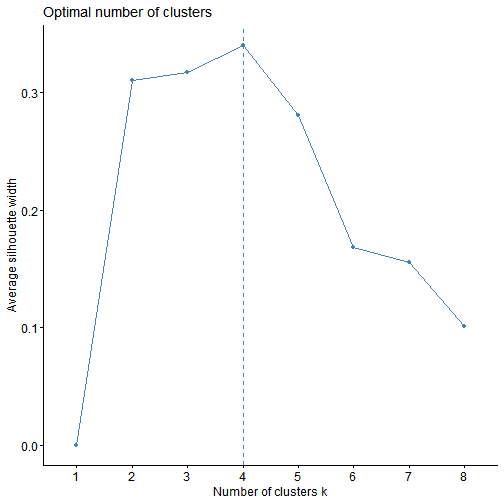
</code></pre>

<p><img src="/assets/sustainability-analysis-project/clustering-2.png" alt="plot of chunk clustering" /></p>

<pre><code class="language-r"># Fit K-means (set k after inspecting above plots)
k &lt;- 3
km &lt;- stats::kmeans(X_scaled, centers = k, nstart = 50)

# Attach cluster ids to companies
clust_out &lt;- clust_df %&gt;% mutate(cluster = factor(km$cluster))
DT::datatable(clust_out, caption = "Company → Cluster assignments")
</code></pre>

<pre><code>## Error in loadNamespace(name): there is no package called 'webshot'
</code></pre>

<pre><code class="language-r"># Companies in each cluster (compact list)
companies_by_cluster &lt;- clust_out %&gt;%
  group_by(cluster) %&gt;%
  summarise(companies = paste(company_name, collapse = ", "), .groups = "drop")
DT::datatable(companies_by_cluster, caption = "Companies in each cluster")
</code></pre>

<pre><code>## Error in loadNamespace(name): there is no package called 'webshot'
</code></pre>

<pre><code class="language-r"># PCA for labeled visualization (labels = company names)
rownames(X_scaled) &lt;- clust_df$company_name
pca_obj &lt;- stats::prcomp(X_scaled, center = FALSE, scale. = FALSE)  # already scaled

factoextra::fviz_pca_ind(
  pca_obj,
  geom = "point",
  habillage = clust_out$cluster,   # color by cluster
  addEllipses = FALSE,             # avoid ellipse warnings for small clusters
  label = "all",                   # show company labels
  repel = TRUE,                    # nicer label placement
  title = "Company Segments (PCA with labels)"
)
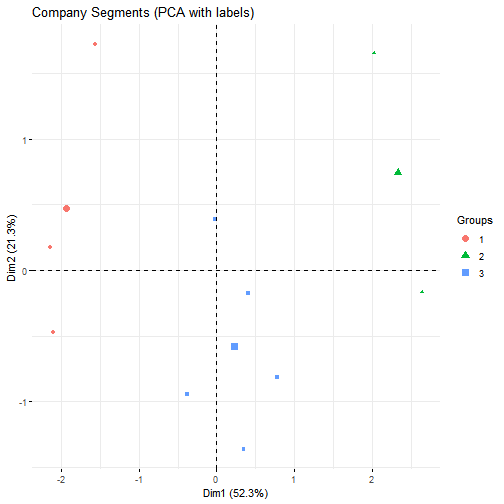
</code></pre>

<p><img src="/assets/sustainability-analysis-project/clustering-3.png" alt="plot of chunk clustering" /></p>

<pre><code class="language-r"># PCA loadings table to interpret Dim1/Dim2 drivers
loadings &lt;- tibble::as_tibble(pca_obj$rotation[, 1:2], rownames = "variable")
colnames(loadings) &lt;- c("variable", "Dim1_loading", "Dim2_loading")
DT::datatable(loadings, caption = "PCA loadings (which variables drive Dim1/Dim2)")
</code></pre>

<pre><code>## Error in loadNamespace(name): there is no package called 'webshot'
</code></pre>

<pre><code class="language-r"># Cluster-level profiles (means of original features)
cluster_profiles &lt;- clust_out %&gt;%
  group_by(cluster) %&gt;%
  summarise(across(all_of(vars_used), ~ mean(.x, na.rm = TRUE)), .groups = "drop")
DT::datatable(cluster_profiles, caption = "Cluster profiles (feature means)")
</code></pre>

<pre><code>## Error in loadNamespace(name): there is no package called 'webshot'
</code></pre>

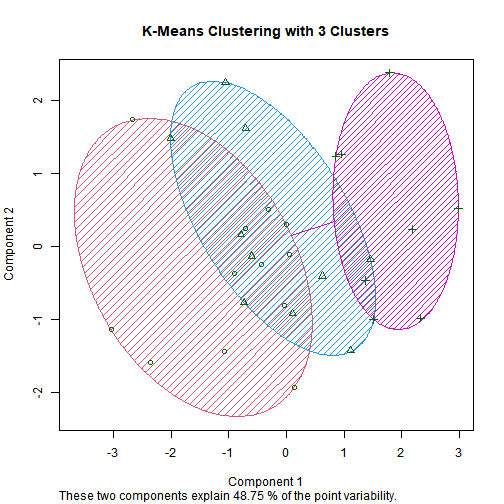
<ul>
  <li>
    <p>Three groups emerge:</p>

    <ul>
      <li>
        <p><strong>Efficient &amp; Profitable</strong> (low emissions, higher returns).</p>
      </li>
      <li>
        <p><strong>Transitioners</strong> (partial improvements).</p>
      </li>
      <li>
        <p><strong>Underperformers</strong> (high energy/emissions, low returns).</p>
      </li>
    </ul>
  </li>
</ul>

<!-- -->

<ul>
  <li>Automotive company stands out with both high emissions and high profitability.</li>
</ul>

<h2 id="65-predictive-analysis">6.5) Predictive analysis</h2>

<h3 id="651-company-wise-prediction">6.5.1) Company-wise Prediction</h3>

<pre><code class="language-r"># Filter company
df_c &lt;- df %&gt;% filter(company_name == "Artemis Medicare Services Ltd.")

# Train/test split (latest year as test, earlier years as train)
train &lt;- df_c %&gt;% filter(year &lt; max(year))
test  &lt;- df_c %&gt;% filter(year == max(year))

# Model: ROE as dependent, predictors = sustainability + turnover + time
model &lt;- lm(roe ~ carbon_emissions + energy_consumption + employee_turnover + year,
            data = train)

summary(model)
</code></pre>

<pre><code>## 
## Call:
## lm(formula = roe ~ carbon_emissions + energy_consumption + employee_turnover + 
##     year, data = train)
## 
## Residuals:
## ALL 3 residuals are 0: no residual degrees of freedom!
## 
## Coefficients: (2 not defined because of singularities)
##                     Estimate Std. Error t value Pr(&gt;|t|)
## (Intercept)        1.006e-01        NaN     NaN      NaN
## carbon_emissions   8.860e-07        NaN     NaN      NaN
## energy_consumption 4.147e-07        NaN     NaN      NaN
## employee_turnover         NA         NA      NA       NA
## year                      NA         NA      NA       NA
## 
## Residual standard error: NaN on 0 degrees of freedom
## Multiple R-squared:      1,	Adjusted R-squared:    NaN 
## F-statistic:   NaN on 2 and 0 DF,  p-value: NA
</code></pre>

<pre><code class="language-r"># Predict on test
test$pred_roe &lt;- predict(model, newdata = test)

# Metrics
rmse &lt;- function(a, p) sqrt(mean((a - p)^2, na.rm = TRUE))
mae  &lt;- function(a, p) mean(abs(a - p), na.rm = TRUE)
r2   &lt;- function(a, p) 1 - sum((a - p)^2, na.rm = TRUE) /
                      sum((a - mean(a, na.rm = TRUE))^2, na.rm = TRUE)

cat("RMSE:", rmse(test$roe, test$pred_roe), "\n")
</code></pre>

<pre><code>## RMSE: 0.002823746
</code></pre>

<pre><code class="language-r">cat("MAE :", mae(test$roe,  test$pred_roe), "\n")
</code></pre>

<pre><code>## MAE : 0.002823746
</code></pre>

<pre><code class="language-r">cat("R^2 :", r2(test$roe,   test$pred_roe), "\n")
</code></pre>

<pre><code>## R^2 : -Inf
</code></pre>

<pre><code class="language-r"># Example: Artemis Medicare Services Ltd.
df_c &lt;- df %&gt;% filter(company_name == "Artemis Medicare Services Ltd.")

# Set up 1 row, 3 columns layout
par(mfrow = c(1, 3))

# 1. Carbon Emissions vs ROE
plot(df_c$carbon_emissions, df_c$roe,
     xlab = "Carbon Emissions", ylab = "ROE",
     main = "Emissions vs ROE",
     pch = 19, col = "blue")
abline(lm(roe ~ carbon_emissions, data = df_c), col = "red", lwd = 2)

# 2. Energy Consumption vs ROE
plot(df_c$energy_consumption, df_c$roe,
     xlab = "Energy Consumption", ylab = "ROE",
     main = "Energy vs ROE",
     pch = 19, col = "darkgreen")
abline(lm(roe ~ energy_consumption, data = df_c), col = "red", lwd = 2)

# 3. Employee Turnover vs ROE
plot(df_c$employee_turnover, df_c$roe,
     xlab = "Employee Turnover", ylab = "ROE",
     main = "Turnover vs ROE",
     pch = 19, col = "purple")
abline(lm(roe ~ employee_turnover, data = df_c), col = "red", lwd = 2)
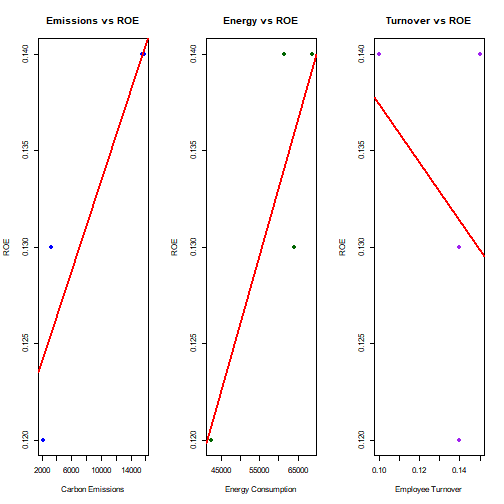
</code></pre>

<p><img src="/assets/sustainability-analysis-project/prediction1-1.png" alt="plot of chunk prediction1" /></p>

<pre><code class="language-r"># Reset to default
par(mfrow = c(1,1))
</code></pre>

<ul>
  <li>
    <p>Models collapse due to very few years per company (overfitting, meaningless coefficients).</p>
  </li>
  <li>
    <p>Highlights the <strong>data depth problem</strong> in company-level analytics.</p>
  </li>
</ul>

<h3 id="652-collective-model">6.5.2) Collective Model</h3>

<pre><code class="language-r"># Train/test split: use &lt;=2023 for training, &gt;=2024 for testing
train &lt;- df %&gt;% filter(year &lt;= 2023)
test  &lt;- df %&gt;% filter(year &gt;= 2024)

# --- ROE model (main dependent variable) ---
model_roe &lt;- lm(
  roe ~ carbon_emissions + energy_consumption + employee_turnover +
        industry_type + ceo_gender + year,
  data = train
)

summary(model_roe)
</code></pre>

<pre><code>## 
## Call:
## lm(formula = roe ~ carbon_emissions + energy_consumption + employee_turnover + 
##     industry_type + ceo_gender + year, data = train)
## 
## Residuals:
##      Min       1Q   Median       3Q      Max 
## -0.17750 -0.07029 -0.00265  0.02201  0.39258 
## 
## Coefficients:
##                                                  Estimate Std. Error t value Pr(&gt;|t|)
## (Intercept)                                    -2.063e+01  1.320e+02  -0.156    0.878
## carbon_emissions                                4.553e-06  6.610e-06   0.689    0.504
## energy_consumption                             -2.880e-09  4.787e-09  -0.602    0.559
## employee_turnover                              -2.251e-01  4.274e-01  -0.527    0.608
## industry_typeHealthcare                         1.937e-01  2.263e-01   0.856    0.409
## industry_typePharmaceuticals and Biotechnology  2.534e-01  2.857e-01   0.887    0.392
## ceo_genderFemale                               -1.680e-02  1.198e-01  -0.140    0.891
## year                                            1.021e-02  6.532e-02   0.156    0.878
## 
## Residual standard error: 0.1561 on 12 degrees of freedom
##   (1 observation deleted due to missingness)
## Multiple R-squared:  0.1638,	Adjusted R-squared:  -0.324 
## F-statistic: 0.3358 on 7 and 12 DF,  p-value: 0.9222
</code></pre>

<pre><code class="language-r"># Predictions
test$pred_roe &lt;- predict(model_roe, newdata = test)

# --- ROA model (secondary diagnostic) ---
model_roa &lt;- lm(
  roa ~ carbon_emissions + energy_consumption + employee_turnover +
        industry_type + ceo_gender + year,
  data = train
)

summary(model_roa)
</code></pre>

<pre><code>## 
## Call:
## lm(formula = roa ~ carbon_emissions + energy_consumption + employee_turnover + 
##     industry_type + ceo_gender + year, data = train)
## 
## Residuals:
##      Min       1Q   Median       3Q      Max 
## -0.14946 -0.04262 -0.00180  0.02661  0.34493 
## 
## Coefficients:
##                                                  Estimate Std. Error t value Pr(&gt;|t|)
## (Intercept)                                    -2.239e+01  1.084e+02  -0.207    0.840
## carbon_emissions                                4.189e-06  5.430e-06   0.771    0.455
## energy_consumption                             -1.371e-09  3.932e-09  -0.349    0.733
## employee_turnover                              -5.568e-02  3.511e-01  -0.159    0.877
## industry_typeHealthcare                         1.465e-01  1.859e-01   0.788    0.446
## industry_typePharmaceuticals and Biotechnology  1.429e-01  2.347e-01   0.609    0.554
## ceo_genderFemale                               -2.333e-02  9.838e-02  -0.237    0.817
## year                                            1.106e-02  5.366e-02   0.206    0.840
## 
## Residual standard error: 0.1282 on 12 degrees of freedom
##   (1 observation deleted due to missingness)
## Multiple R-squared:  0.1457,	Adjusted R-squared:  -0.3527 
## F-statistic: 0.2923 on 7 and 12 DF,  p-value: 0.9443
</code></pre>

<pre><code class="language-r">test$pred_roa &lt;- predict(model_roa, newdata = test)

# --- Model performance metrics ---
rmse &lt;- function(a, p) sqrt(mean((a - p)^2, na.rm = TRUE))
mae  &lt;- function(a, p) mean(abs(a - p), na.rm = TRUE)
r2   &lt;- function(a, p) 1 - sum((a - p)^2, na.rm = TRUE) /
                      sum((a - mean(a, na.rm = TRUE))^2, na.rm = TRUE)

metrics &lt;- tibble::tibble(
  Metric = c("RMSE", "MAE", "R^2"),
  ROE    = c(rmse(test$roe, test$pred_roe),
             mae(test$roe,  test$pred_roe),
             r2(test$roe,   test$pred_roe)),
  ROA    = c(rmse(test$roa, test$pred_roa),
             mae(test$roa,  test$pred_roa),
             r2(test$roa,   test$pred_roa))
)

DT::datatable(metrics, caption = "Pooled Model Performance (ROE vs ROA)")
</code></pre>

<pre><code>## Error in loadNamespace(name): there is no package called 'webshot'
</code></pre>

<pre><code class="language-r"># --- Actual vs Predicted table for test set ---
test_results &lt;- test %&gt;%
  select(company_name, year,
         roe, pred_roe,
         roa, pred_roa)

DT::datatable(test_results, caption = "Test Set Predictions — Pooled Model")
</code></pre>

<pre><code>## Error in loadNamespace(name): there is no package called 'webshot'
</code></pre>

<pre><code class="language-r"># --- Partial effect plots for each predictor in ROE model ---

# 1. Carbon Emissions vs ROE
plot(train$carbon_emissions, train$roe,
     xlab = "Carbon Emissions", ylab = "ROE",
     main = "Effect of Carbon Emissions on ROE",
     pch = 19, col = "blue")

emm_em &lt;- data.frame(
  carbon_emissions = seq(min(train$carbon_emissions, na.rm = TRUE),
                         max(train$carbon_emissions, na.rm = TRUE),
                         length.out = 100),
  energy_consumption = mean(train$energy_consumption, na.rm = TRUE),
  employee_turnover  = mean(train$employee_turnover, na.rm = TRUE),
  industry_type      = train$industry_type[1], # pick one level as baseline
  ceo_gender         = train$ceo_gender[1],
  year               = mean(train$year, na.rm = TRUE)
)

lines(emm_em$carbon_emissions,
      predict(model_roe, newdata = emm_em),
      col = "red", lwd = 2)

legend("topleft", legend = c("Actual Data", "Fitted Line"),
       col = c("blue","red"), pch = c(19, NA), lty = c(NA,1))
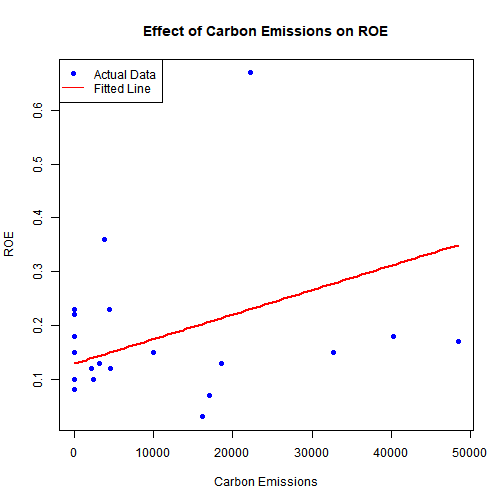
</code></pre>

<p><img src="/assets/sustainability-analysis-project/prediction2-1.png" alt="plot of chunk prediction2" /></p>

<pre><code class="language-r"># 2. Energy Consumption vs ROE
plot(train$energy_consumption, train$roe,
     xlab = "Energy Consumption", ylab = "ROE",
     main = "Effect of Energy Consumption on ROE",
     pch = 19, col = "darkgreen")

emm_en &lt;- data.frame(
  carbon_emissions   = mean(train$carbon_emissions, na.rm = TRUE),
  energy_consumption = seq(min(train$energy_consumption, na.rm = TRUE),
                           max(train$energy_consumption, na.rm = TRUE),
                           length.out = 100),
  employee_turnover  = mean(train$employee_turnover, na.rm = TRUE),
  industry_type      = train$industry_type[1],
  ceo_gender         = train$ceo_gender[1],
  year               = mean(train$year, na.rm = TRUE)
)

lines(emm_en$energy_consumption,
      predict(model_roe, newdata = emm_en),
      col = "red", lwd = 2)

legend("topleft", legend = c("Actual Data", "Fitted Line"),
       col = c("darkgreen","red"), pch = c(19, NA), lty = c(NA,1))
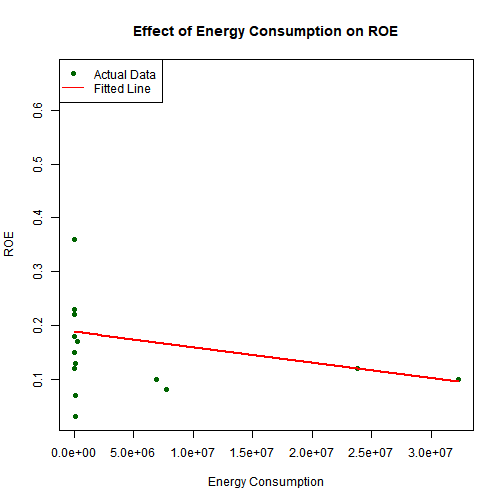
</code></pre>

<p><img src="/assets/sustainability-analysis-project/prediction2-2.png" alt="plot of chunk prediction2" /></p>

<pre><code class="language-r"># 3. Employee Turnover vs ROE
plot(train$employee_turnover, train$roe,
     xlab = "Employee Turnover", ylab = "ROE",
     main = "Effect of Employee Turnover on ROE",
     pch = 19, col = "purple")

emm_to &lt;- data.frame(
  carbon_emissions   = mean(train$carbon_emissions, na.rm = TRUE),
  energy_consumption = mean(train$energy_consumption, na.rm = TRUE),
  employee_turnover  = seq(min(train$employee_turnover, na.rm = TRUE),
                           max(train$employee_turnover, na.rm = TRUE),
                           length.out = 100),
  industry_type      = train$industry_type[1],
  ceo_gender         = train$ceo_gender[1],
  year               = mean(train$year, na.rm = TRUE)
)

lines(emm_to$employee_turnover,
      predict(model_roe, newdata = emm_to),
      col = "red", lwd = 2)

legend("topleft", legend = c("Actual Data", "Fitted Line"),
       col = c("purple","red"), pch = c(19, NA), lty = c(NA,1))
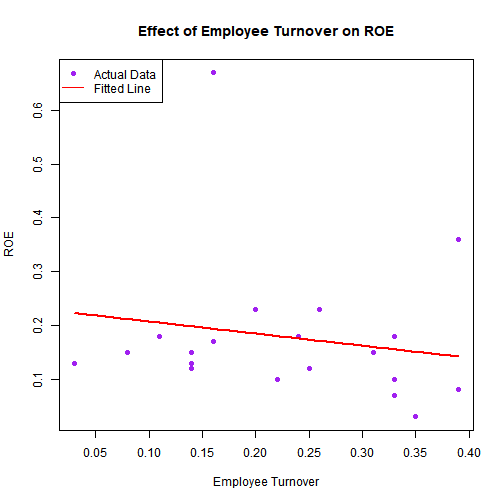
</code></pre>

<p><img src="/assets/sustainability-analysis-project/prediction2-3.png" alt="plot of chunk prediction2" /></p>

<ul>
  <li>
    <p>Pooled regression statistically valid but predictive accuracy remains weak.</p>
  </li>
  <li>
    <p>Useful for identifying <strong>directional patterns</strong> (-turnover -&gt; -ROE ; +emissions -&gt; -ROE).</p>
  </li>
  <li>
    <p>Confirms that external factors (market shocks, policies, R&amp;D) drive much of the unexplained variation.</p>
  </li>
</ul>

<h1 id="7-conclusion">7) Conclusion</h1>

<ul>
  <li>
    <p>Our analysis linked sustainability metrics such as emissions, energy use and turnover with financial performance such as ROE/ROA across 10 companies over 5 years.</p>
  </li>
  <li>
    <p>Company-level models failed due to very limited data (4–5 years per firm), showing why data depth matters in predictive analytics.</p>
  </li>
  <li>
    <p>Pooled regression models were statistically valid but had weak predictive accuracy, highlighting the complex nature of ROE.</p>
  </li>
  <li>
    <p>Despite poor prediction, the models provided directional insights:</p>

    <ul>
      <li>
        <p><strong>High employee turnover → consistently lower ROE/ROA.</strong></p>
      </li>
      <li>
        <p><strong>High emissions &amp; energy intensity → generally linked with weaker returns.</strong></p>
      </li>
    </ul>
  </li>
  <li>
    <p>Clustering analysis grouped firms into: efficient &amp; profitable, underperformers, and transitioners — offering a method for strategic benchmarking.</p>
  </li>
</ul>

<h1 id="8-use-of-ai-declaration">8) Use of AI declaration</h1>

<blockquote>
  <p><strong>Declaration:</strong> AI tools were used only for grammatical refinement, formatting and pretty tables and graphs. All analysis, data preparation, modeling choices, and interpretations are original work.</p>
</blockquote>

<h1 id="9-data-sources-declaration">9) Data sources declaration</h1>

<ul>
  <li>
    <p>Annual reports sourced from NSE India webpage</p>
  </li>
  <li>
    <p>Sustainability reports also sourced from NSE India Webpage</p>
  </li>
  <li>
    <p>Ratios through Dion Solutions Ltd. Available on MoneyControl</p>
  </li>
</ul>

<h1 id="10-blog-link">10) Blog link</h1>

<p><em>https://proplayerplayz.github.io</em></p>]]></content><author><name>Sakthi Swaroopan S</name></author><category term="Other" /><summary type="html"><![CDATA[Sakthi Swaroopan S - CB.BU.P2ASB25147]]></summary></entry><entry><title type="html">Customer Review Analysis</title><link href="https://proplayerplayz.github.io/2025/08/26/customer-review-text-mining.html" rel="alternate" type="text/html" title="Customer Review Analysis" /><published>2025-08-26T00:00:00+00:00</published><updated>2025-08-26T00:00:00+00:00</updated><id>https://proplayerplayz.github.io/2025/08/26/customer-review-text-mining</id><content type="html" xml:base="https://proplayerplayz.github.io/2025/08/26/customer-review-text-mining.html"><![CDATA[<h2 id="1-introduction">1. Introduction</h2>

<p>Customer reviews are very valuable information for business decisions.</p>

<p>We are going to use text mining to extract quantifiable information to use for analysis</p>

<h2 id="2-data-pre-processing">2. Data Pre-processing</h2>

<p>We have to convert the unstructured data into structured format to apply descriptive statistics.</p>

<pre><code>##  [1] "building"           "corpus"             "cosine_dist_matrix" "cosine_distance"    "cosine_similarity" 
##  [6] "crs"                "crv"                "d"                  "ddata"              "denominator"       
## [11] "dist_obj"           "dtm"                "dtm_matrix"         "g"                  "groceries_data"    
## [16] "hclust_obj"         "m"                  "numerator"          "p01"                "p02"               
## [21] "p03"                "p04"                "p05"                "p06"                "p07"               
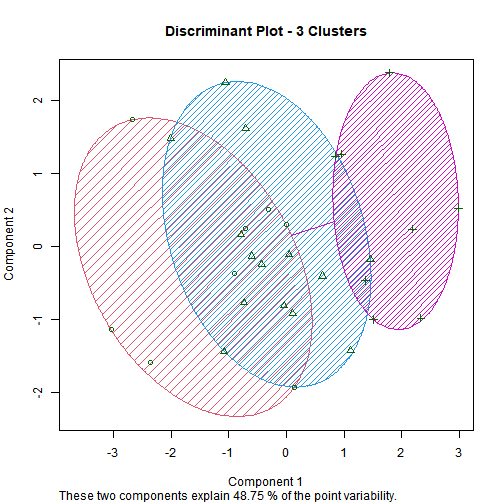
## [26] "reviews"            "rules"              "rules_conf"         "scoring"            "texts"             
## [31] "transactions_data"  "transactions_list"  "v"
</code></pre>

<pre><code class="language-r">dtm &lt;- DocumentTermMatrix(corpus)
inspect(dtm)
</code></pre>

<pre><code>## &lt;&lt;DocumentTermMatrix (documents: 21, terms: 185)&gt;&gt;
## Non-/sparse entries: 254/3631
## Sparsity           : 93%
## Maximal term length: 11
## Weighting          : term frequency (tf)
## Sample             :
##     Terms
## Docs alfredo best chicken deep dish food good great pizza sauce
##   10       1    0       1    0    0    1    0     0     1     0
##   11       0    0       0    0    0    0    0     0     0     1
##   12       0    1       0    1    1    1    1     0     2     0
##   17       0    0       0    1    1    0    0     0     1     0
##   19       0    1       2    1    1    0    0     0     2     0
##   2        0    0       0    0    0    2    1     0     0     0
##   20       1    0       0    0    1    0    1     0     1     0
##   21       0    0       0    0    1    0    1     2     0     0
##   5        0    0       0    0    0    0    0     0     0     2
##   9        1    0       1    0    0    0    1     1     1     1
</code></pre>

<pre><code class="language-r">numerator &lt;- crossprod_simple_triplet_matrix(dtm)
denominator &lt;- sqrt(col_sums(dtm^2)) %*% t(sqrt(col_sums(dtm^2)))
cosine_similarity &lt;- numerator / denominator
cosine_distance &lt;- 1 - cosine_similarity
</code></pre>

<pre><code class="language-r">cosine_dist_matrix &lt;- as.matrix(cosine_distance)
print(round(cosine_dist_matrix, 2))
</code></pre>

<pre><code>##              Terms
## Terms         absolutely  add alfredo also although amazing appetizers atmosphere attitudes bad barely best better butter
##   absolutely        0.00 1.00    0.59 1.00     1.00    1.00       1.00       0.29         1   1   1.00 0.65   0.29   1.00
##   add               1.00 0.00    1.00 1.00     1.00    1.00       1.00       1.00         1   1   1.00 1.00   1.00   1.00
##   alfredo           0.59 1.00    0.00 1.00     0.42    1.00       1.00       1.00         1   1   1.00 1.00   0.42   0.42
##   also              1.00 1.00    1.00 0.00     1.00    1.00       1.00       1.00         1   1   1.00 0.65   1.00   1.00
##   although          1.00 1.00    0.42 1.00     0.00    1.00       1.00       1.00         1   1   1.00 1.00   1.00   0.00
##              Terms
## Terms         caccatore called cheese cheeses chew chicago chicken choose classic comes complaints cooked creamy crepe cute  day
##   absolutely       1.00   1.00   1.00    1.00 1.00    1.00    1.00   1.00    1.00  1.00       1.00   1.00   1.00  1.00 0.29 1.00
##   add              1.00   1.00   0.29    1.00 1.00    1.00    1.00   1.00    1.00  0.00       1.00   1.00   1.00  1.00 1.00 1.00
##   alfredo          1.00   1.00   1.00    1.00 1.00    1.00    0.53   1.00    1.00  1.00       1.00   1.00   1.00  1.00 1.00 1.00
##   also             1.00   0.29   1.00    1.00 1.00    0.29    1.00   1.00    1.00  1.00       1.00   1.00   1.00  1.00 1.00 1.00
##   although         1.00   1.00   1.00    1.00 1.00    1.00    0.59   1.00    1.00  1.00       1.00   1.00   1.00  1.00 1.00 1.00
##              Terms
## Terms         deep definite definitely delicious deterrent diamond  die dish dont  dry entire ever excellent eyes famous
##   absolutely  1.00     1.00       1.00      1.00      1.00    1.00 1.00 0.68 1.00 1.00   1.00 1.00      1.00 1.00   1.00
##   add         1.00     1.00       0.00      1.00      1.00    1.00 1.00 0.55 0.00 1.00   0.00 1.00      1.00 1.00   1.00
##   alfredo     1.00     1.00       1.00      1.00      1.00    1.00 1.00 0.74 1.00 0.42   1.00 1.00      1.00 1.00   1.00
##   also        0.59     1.00       1.00      1.00      1.00    1.00 1.00 0.68 1.00 1.00   1.00 0.50      1.00 1.00   1.00
##   although    1.00     1.00       1.00      1.00      1.00    1.00 1.00 1.00 1.00 1.00   1.00 1.00      1.00 1.00   1.00
##              Terms
## Terms         fantastic fantastico favorite fettuccine fighting filthy five flavorful food fooddo forever fourty fresh friend
##   absolutely       0.29       1.00     1.00       0.29     1.00   1.00 1.00      1.00 0.76   1.00    1.00   1.00  1.00   1.00
##   add              1.00       1.00     1.00       1.00     1.00   1.00 1.00      1.00 1.00   1.00    1.00   1.00  1.00   1.00
##   alfredo          1.00       1.00     1.00       0.42     1.00   1.00 1.00      0.42 0.81   1.00    1.00   1.00  0.59   1.00
##   also             1.00       1.00     1.00       1.00     0.29   1.00 0.50      1.00 0.53   1.00    1.00   0.29  1.00   1.00
##   although         1.00       1.00     1.00       1.00     1.00   1.00 1.00      0.00 0.67   1.00    1.00   1.00  0.29   1.00
##              Terms
## Terms         friendly garden garlic gnocchi going good  got great happy heard hiking home homemade house however huge including
##   absolutely      1.00   0.29   1.00    1.00     1 0.79 1.00  0.75  1.00  1.00   1.00 1.00     1.00  1.00    1.00 1.00      1.00
##   add             1.00   1.00   1.00    1.00     1 0.70 1.00  0.29  1.00  1.00   1.00 1.00     1.00  1.00    1.00 1.00      1.00
##   alfredo         1.00   0.42   0.42    1.00     1 0.65 1.00  0.80  1.00  0.42   1.00 1.00     1.00  1.00    0.42 1.00      1.00
##   also            1.00   1.00   1.00    1.00     1 0.36 0.29  0.75  1.00  1.00   1.00 1.00     1.00  0.29    1.00 1.00      1.00
##   although        1.00   1.00   0.00    1.00     1 1.00 1.00  1.00  1.00  1.00   1.00 1.00     1.00  1.00    0.00 1.00      1.00
##              Terms
## Terms         instead italian item  ive just lasagna lasagne left like linguini little  lol long loud lousy love lovers made
##   absolutely     1.00    1.00 1.00 0.29 1.00    1.00    0.29 1.00 1.00     1.00   1.00 0.29 1.00 1.00     1 1.00   1.00 1.00
##   add            1.00    1.00 1.00 1.00 1.00    0.11    1.00 1.00 0.00     1.00   1.00 1.00 1.00 1.00     1 1.00   1.00 0.42
##   alfredo        1.00    1.00 1.00 0.42 0.42    1.00    0.42 1.00 1.00     0.42   1.00 1.00 1.00 1.00     1 1.00   1.00 1.00
##   also           1.00    1.00 1.00 1.00 1.00    1.00    1.00 0.29 1.00     1.00   1.00 1.00 1.00 1.00     1 1.00   1.00 1.00
##   although       1.00    1.00 1.00 1.00 1.00    1.00    1.00 1.00 1.00     0.00   1.00 1.00 1.00 1.00     1 1.00   1.00 1.00
##              Terms
## Terms         make manicotti many meals meat meatballs melt melts menu minute mouth mozarella much mushrooms mussels nice okay
##   absolutely  1.00      1.00 0.50     1 1.00      1.00 1.00  1.00 1.00   1.00  1.00      1.00 1.00      1.00    1.00 1.00 1.00
##   add         1.00      1.00 1.00     1 0.42      1.00 1.00  1.00 1.00   1.00  1.00      1.00 1.00      1.00    1.00 1.00 1.00
##   alfredo     1.00      1.00 0.59     1 1.00      1.00 1.00  1.00 1.00   1.00  1.00      1.00 1.00      1.00    0.42 0.59 0.42
##   also        1.00      1.00 1.00     1 1.00      1.00 1.00  1.00 0.29   0.29  1.00      1.00 1.00      1.00    1.00 0.50 1.00
##   although    1.00      1.00 1.00     1 1.00      1.00 1.00  1.00 1.00   1.00  1.00      1.00 1.00      1.00    0.00 1.00 1.00
##              Terms
## Terms         okive olive options order ordered ordering overpower overrated  pan parm pasta people perfectly pesto  pie pizza
##   absolutely   0.29  0.29    1.00  1.00    1.00     1.00      1.00         1 1.00 1.00  1.00   1.00      1.00  1.00 1.00  0.82
##   add          1.00  1.00    1.00  1.00    1.00     1.00      0.00         1 1.00 1.00  1.00   1.00      1.00  1.00 1.00  1.00
##   alfredo      0.42  0.42    1.00  1.00    0.42     1.00      1.00         1 1.00 1.00  1.00   1.00      1.00  1.00 1.00  0.55
##   also         1.00  1.00    1.00  1.00    1.00     1.00      1.00         1 0.29 1.00  1.00   0.29      1.00  1.00 0.29  0.45
##   although     1.00  1.00    1.00  1.00    0.00     1.00      1.00         1 1.00 1.00  1.00   1.00      1.00  1.00 1.00  0.74
##              Terms
## Terms         pizzas place places plump portions pretty prices ready real really reason reasonable recommend rest ricotta rough
##   absolutely    1.00  1.00   0.29  1.00     1.00   1.00   1.00  1.00 1.00   1.00   1.00       1.00      1.00 1.00    1.00  1.00
##   add           1.00  1.00   1.00  1.00     1.00   1.00   1.00  1.00 1.00   0.42   1.00       1.00      1.00 1.00    0.29  1.00
##   alfredo       1.00  1.00   0.42  1.00     1.00   1.00   1.00  1.00 1.00   0.67   1.00       1.00      1.00 1.00    1.00  1.00
##   also          1.00  1.00   1.00  1.00     1.00   1.00   1.00  0.29 0.29   0.59   1.00       1.00      1.00 0.29    1.00  1.00
##   although      1.00  1.00   1.00  1.00     1.00   1.00   1.00  1.00 1.00   1.00   1.00       1.00      1.00 1.00    1.00  1.00
##              Terms
## Terms         sauce seamlessly seating service shrimp shrimps slow spaghetti special spectacular spices staff stars steamed stop
##   absolutely   1.00       1.00    1.00    1.00   1.00    1.00 1.00      1.00    1.00        1.00   1.00  1.00  1.00    1.00 1.00
##   add          1.00       1.00    1.00    1.00   1.00    1.00 1.00      1.00    1.00        1.00   0.00  1.00  1.00    1.00 1.00
##   alfredo      0.76       1.00    1.00    1.00   1.00    1.00 1.00      1.00    1.00        0.42   1.00  1.00  1.00    0.42 1.00
##   also         1.00       1.00    0.29    0.59   1.00    1.00 1.00      1.00    1.00        1.00   1.00  1.00  1.00    1.00 1.00
##   although     1.00       1.00    1.00    1.00   1.00    1.00 1.00      1.00    1.00        1.00   1.00  1.00  1.00    0.00 1.00
##              Terms
## Terms         stopped stuffed style sublime super tails take takes taste tasted thing time tops tortellini tortellinis tried
##   absolutely        1    1.00  1.00    1.00  1.00  1.00 1.00  1.00  0.50   1.00  1.00 1.00 1.00       1.00        1.00  0.50
##   add               1    1.00  1.00    1.00  1.00  1.00 1.00  1.00  1.00   1.00  1.00 1.00 1.00       1.00        1.00  1.00
##   alfredo           1    1.00  1.00    1.00  1.00  1.00 1.00  1.00  0.18   0.42  0.42 1.00 1.00       1.00        1.00  0.59
##   also              1    1.00  0.29    1.00  1.00  1.00 1.00  1.00  1.00   1.00  1.00 1.00 0.29       1.00        1.00  1.00
##   although          1    1.00  1.00    1.00  1.00  1.00 1.00  1.00  0.29   1.00  1.00 1.00 1.00       1.00        1.00  1.00
##              Terms
## Terms         veggie wait waiter want wasnt watering way white wine worth yummy
##   absolutely    1.00 1.00   0.50 1.00  1.00     1.00   1  1.00 1.00  1.00  1.00
##   add           1.00 1.00   1.00 0.00  1.00     1.00   1  1.00 1.00  1.00  1.00
##   alfredo       1.00 1.00   0.59 1.00  0.42     1.00   1  0.42 0.42  1.00  1.00
##   also          1.00 0.29   1.00 1.00  1.00     1.00   1  1.00 1.00  0.29  1.00
##   although      1.00 1.00   1.00 1.00  1.00     1.00   1  0.00 0.00  1.00  1.00
##  [ reached 'max' / getOption("max.print") -- omitted 180 rows ]
</code></pre>

<pre><code class="language-r">heatmap(cosine_dist_matrix, col = colorRampPalette(c("white", "steelblue"))(100))
</code></pre>

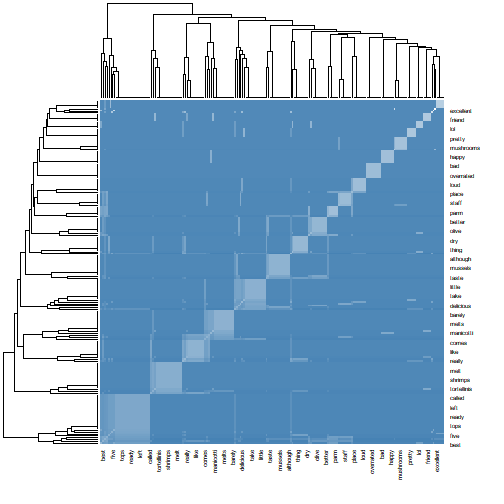
<p><img src="/assets/text-mining/heatmap-1.png" alt="plot of chunk heatmap" /></p>

<pre><code class="language-r">dtm_matrix &lt;- as.matrix(dtm)  # Convert sparse DTM to full matrix
dist_obj &lt;- proxy::dist(dtm_matrix, method = "cosine")  # Proper cosine distance

hclust_obj &lt;- hclust(dist_obj, method = "ward.D2")
plot(hclust_obj, labels = paste("Doc", 1:nrow(dtm_matrix)), main = "Document Clustering")
</code></pre>

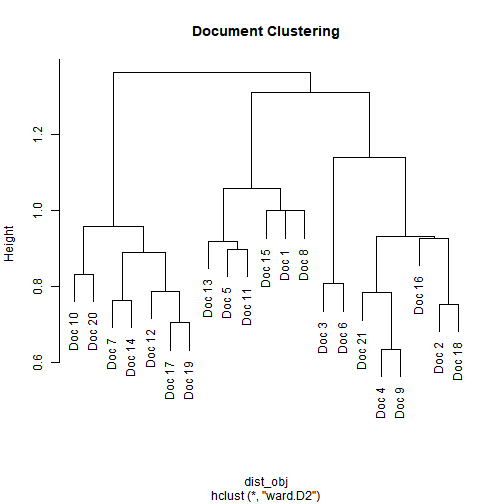
<p><img src="/assets/text-mining/clustering-1.png" alt="plot of chunk clustering" /></p>

<pre><code class="language-r">m &lt;- as.matrix(dtm)
v &lt;- sort(colSums(m), decreasing = TRUE)
d &lt;- data.frame(word = names(v), freq = v)


set.seed(123)  # for reproducibility
wordcloud(
  words = d$word,
  freq = d$freq,
  min.freq = 1,
  max.words = 100,
  random.order = FALSE,
  rot.per = 0.35,
  colors = brewer.pal(8, "Dark2")
)
</code></pre>

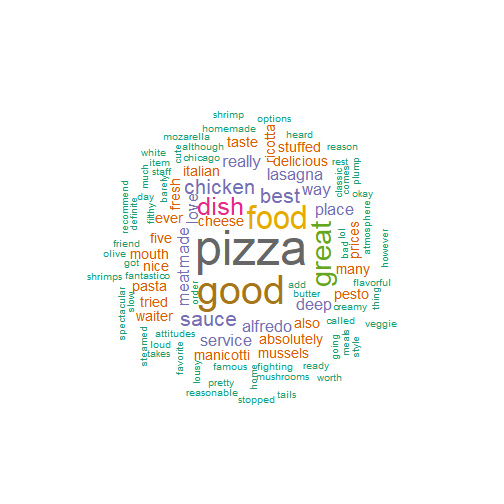
<p><img src="/assets/text-mining/wordcloud-1.png" alt="plot of chunk wordcloud" /></p>]]></content><author><name>Sakthi Swaroopan S</name></author><category term="Other" /><summary type="html"><![CDATA[1. Introduction]]></summary></entry><entry><title type="html">Market Basket Analysis</title><link href="https://proplayerplayz.github.io/2025/08/26/market-basket-analysis.html" rel="alternate" type="text/html" title="Market Basket Analysis" /><published>2025-08-26T00:00:00+00:00</published><updated>2025-08-26T00:00:00+00:00</updated><id>https://proplayerplayz.github.io/2025/08/26/market-basket-analysis</id><content type="html" xml:base="https://proplayerplayz.github.io/2025/08/26/market-basket-analysis.html"><![CDATA[<h2 id="1-introduction">1. Introduction</h2>

<p>Market Basket Analysis is a method to understand the purchasing behavior/choice of customers. Based on the frequency of purchases(support) and associations of items(confidence) we can develop rules to predict the items in the customer basket.</p>

<hr />

<h2 id="2-market-basket-analysis-using-groceries-dataset-from-kaggle">2. Market Basket Analysis using Groceries Dataset from Kaggle</h2>

<h3 id="21-preliminary-data-exploration">2.1. Preliminary Data Exploration</h3>

<pre><code>##   Member_number       Date  itemDescription
## 1          1808 21-07-2015   tropical fruit
## 2          2552 05-01-2015       whole milk
## 3          2300 19-09-2015        pip fruit
## 4          1187 12-12-2015 other vegetables
## 5          3037 01-02-2015       whole milk
## 6          4941 14-02-2015       rolls/buns
</code></pre>

<pre><code>##       Member_number       Date       itemDescription
## 38760          3364 06-05-2014                   oil
## 38761          4471 08-10-2014         sliced cheese
## 38762          2022 23-02-2014                 candy
## 38763          1097 16-04-2014              cake bar
## 38764          1510 03-12-2014 fruit/vegetable juice
## 38765          1521 26-12-2014              cat food
</code></pre>

<pre><code>## 'data.frame':	38765 obs. of  3 variables:
##  $ Member_number  : int  1808 2552 2300 1187 3037 4941 4501 3803 2762 4119 ...
##  $ Date           : chr  "21-07-2015" "05-01-2015" "19-09-2015" "12-12-2015" ...
##  $ itemDescription: chr  "tropical fruit" "whole milk" "pip fruit" "other vegetables" ...
</code></pre>

<pre><code>## [1] 3898
</code></pre>

<p>The Groceries_Data from Kaggle has 38765 Observations and 3 Variables including Member_number, Date_of_Purchase and the items in the basket. The transaction data spans over the years 2014 and 2015.</p>

<hr />

<h3 id="22-preparing-the-data-for-market-basket-analysis">2.2. Preparing the data for Market Basket Analysis</h3>

<p>The data is currently in a “row per item” format, we will need to convert this into “row per transaction” format to effectively perform the market basket analysis.</p>

<p>Using association rules package we get the “baskets” of items from the data to use with the apriori algorithm to find association rules</p>

<p>We use these transactions to get a result of combinations of the items in the “basket” along with values such as support, confidence and list which help us determine the likelihood that the customer buys a certain item given they have already picked out certain items. We will display the top 10 items in this list to get an idea of how our result looks like</p>

<pre><code>## Apriori
## 
## Parameter specification:
##  confidence minval smax arem  aval originalSupport maxtime support minlen maxlen target  ext
##         0.2    0.1    1 none FALSE            TRUE       5   5e-04      2     10  rules TRUE
## 
## Algorithmic control:
##  filter tree heap memopt load sort verbose
##     0.1 TRUE TRUE  FALSE TRUE    2    TRUE
## 
## Absolute minimum support count: 7 
## 
## set item appearances ...[0 item(s)] done [0.00s].
## set transactions ...[167 item(s), 14963 transaction(s)] done [0.00s].
## sorting and recoding items ... [158 item(s)] done [0.00s].
## creating transaction tree ... done [0.00s].
## checking subsets of size 1 2 3 4 done [0.00s].
## writing ... [19 rule(s)] done [0.00s].
## creating S4 object  ... done [0.00s].
</code></pre>

<pre><code>##      lhs                                rhs          support      confidence coverage    lift     count
## [1]  {artif. sweetener}              =&gt; {whole milk} 0.0005346521 0.2758621  0.001938114 1.746815  8   
## [2]  {brandy}                        =&gt; {whole milk} 0.0008688097 0.3421053  0.002539598 2.166281 13   
## [3]  {spices}                        =&gt; {soda}       0.0006014837 0.2250000  0.002673261 2.317051  9   
## [4]  {softener}                      =&gt; {whole milk} 0.0008019782 0.2926829  0.002740092 1.853328 12   
## [5]  {house keeping products}        =&gt; {whole milk} 0.0007351467 0.2444444  0.003007418 1.547872 11   
## [6]  {finished products}             =&gt; {whole milk} 0.0008688097 0.2031250  0.004277217 1.286229 13   
## [7]  {rolls/buns, white bread}       =&gt; {whole milk} 0.0006014837 0.2812500  0.002138609 1.780933  9   
## [8]  {other vegetables, white bread} =&gt; {whole milk} 0.0005346521 0.2051282  0.002606429 1.298914  8   
## [9]  {margarine, soda}               =&gt; {whole milk} 0.0005346521 0.2051282  0.002606429 1.298914  8   
## [10] {curd, rolls/buns}              =&gt; {whole milk} 0.0006014837 0.2195122  0.002740092 1.389996  9
</code></pre>

<p>We can sort the output based on confidence for a clearer picture.</p>

<pre><code>##      lhs                          rhs                support      confidence coverage    lift     count
## [1]  {pork, sausage}           =&gt; {whole milk}       0.0006014837 0.3913043  0.001537125 2.477819  9   
## [2]  {brandy}                  =&gt; {whole milk}       0.0008688097 0.3421053  0.002539598 2.166281 13   
## [3]  {softener}                =&gt; {whole milk}       0.0008019782 0.2926829  0.002740092 1.853328 12   
## [4]  {rolls/buns, white bread} =&gt; {whole milk}       0.0006014837 0.2812500  0.002138609 1.780933  9   
## [5]  {artif. sweetener}        =&gt; {whole milk}       0.0005346521 0.2758621  0.001938114 1.746815  8   
## [6]  {sausage, shopping bags}  =&gt; {other vegetables} 0.0005346521 0.2758621  0.001938114 2.259291  8   
## [7]  {sausage, yogurt}         =&gt; {whole milk}       0.0014702934 0.2558140  0.005747511 1.619866 22   
## [8]  {house keeping products}  =&gt; {whole milk}       0.0007351467 0.2444444  0.003007418 1.547872 11   
## [9]  {pastry, soda}            =&gt; {whole milk}       0.0009356412 0.2295082  0.004076723 1.453293 14   
## [10] {pastry, sausage}         =&gt; {whole milk}       0.0007351467 0.2291667  0.003207913 1.451130 11
</code></pre>

<p>Taking a look at the top 10 rows in the confidence sorted results we can observe that “whole milk” has a high likelihood of being picked when “pork” and “sausage” are also already picked. We also observe similar relation ships between the “LHS” and the “RHS” column. The Results give us an idea of the probability that the “RHS” item is taken when we already have “LHS” items.</p>]]></content><author><name>Sakthi Swaroopan S</name></author><category term="Other" /><summary type="html"><![CDATA[1. Introduction]]></summary></entry><entry><title type="html">Market Segmentation</title><link href="https://proplayerplayz.github.io/2025/08/26/market-segmentation.html" rel="alternate" type="text/html" title="Market Segmentation" /><published>2025-08-26T00:00:00+00:00</published><updated>2025-08-26T00:00:00+00:00</updated><id>https://proplayerplayz.github.io/2025/08/26/market-segmentation</id><content type="html" xml:base="https://proplayerplayz.github.io/2025/08/26/market-segmentation.html"><![CDATA[<h2 id="1-introduction">1. Introduction</h2>

<p>This document will perform Market Segmentation Analysis on the data provided by KTC. We will be looking into importing and performing cluster analysis on the data to find useful patterns in Customer data.</p>

<hr />

<h2 id="2-descriptive-mining">2. Descriptive Mining</h2>

<p>We are going to explore the data and find the patterns and do the segmentation.</p>

<h3 id="21-data-exploration">2.1. Data Exploration</h3>

<p>We have information regarding 30 customers of KTC Company. We have details of their Age, Income, Marital Status, No. of Children and their financial status in the means of whether they have a mortgage loan and other loans.</p>

<pre><code>## # A tibble: 30 × 7
##      Age Female Income Married Children  Loan Mortgage
##    &lt;dbl&gt;  &lt;dbl&gt;  &lt;dbl&gt;   &lt;dbl&gt;    &lt;dbl&gt; &lt;dbl&gt;    &lt;dbl&gt;
##  1    48      1 17546        0        1     0        0
##  2    40      0 30085.       1        3     1        1
##  3    51      1 16575.       1        0     1        0
##  4    23      1 20375.       1        3     0        0
##  5    57      1 50576.       1        0     0        0
##  6    57      1 37870.       1        2     0        0
##  7    22      0  8877.       0        0     0        0
##  8    58      0 24947.       1        0     1        0
##  9    37      1 25304.       1        2     1        0
## 10    54      0 24212.       1        2     1        0
## # ℹ 20 more rows
</code></pre>

<pre><code>## 
## Data frame:crs$dataset[, c(crs$input, crs$risk, crs$target)]	30 observations and 7 variables    Maximum # NAs:0
## 
## 
##          Storage
## Age       double
## Female    double
## Income    double
## Married   double
## Children  double
## Loan      double
## Mortgage  double
</code></pre>

<pre><code>##       Age            Female           Income         Married       Children           Loan           Mortgage  
##  Min.   :22.00   Min.   :0.0000   Min.   : 8877   Min.   :0.0   Min.   :0.0000   Min.   :0.0000   Min.   :0.0  
##  1st Qu.:37.25   1st Qu.:0.0000   1st Qu.:18166   1st Qu.:1.0   1st Qu.:0.0000   1st Qu.:0.0000   1st Qu.:0.0  
##  Median :47.00   Median :1.0000   Median :24241   Median :1.0   Median :0.5000   Median :0.0000   Median :0.0  
##  Mean   :45.97   Mean   :0.5667   Mean   :28012   Mean   :0.8   Mean   :0.9333   Mean   :0.4333   Mean   :0.4  
##  3rd Qu.:56.75   3rd Qu.:1.0000   3rd Qu.:35923   3rd Qu.:1.0   3rd Qu.:2.0000   3rd Qu.:1.0000   3rd Qu.:1.0  
##  Max.   :66.00   Max.   :1.0000   Max.   :59804   Max.   :1.0   Max.   :3.0000   Max.   :1.0000   Max.   :1.0
</code></pre>

<h4 id="211-age">2.1.1. Age</h4>

<pre><code>## crs$dataset["Age"] 
## 
##  1  Variables      30  Observations
## ------------------------------------------------------------------------------------------------------------------------------------
## Age 
##        n  missing distinct     Info     Mean  pMedian      Gmd      .05      .10      .25      .50      .75      .90      .95 
##       30        0       23    0.998    45.97     46.5    15.12    22.45    26.60    37.25    47.00    56.75    61.10    64.20 
## 
## lowest : 22 23 27 31 36, highest: 57 58 61 62 66
## ------------------------------------------------------------------------------------------------------------------------------------
</code></pre>

<h4 id="212-female-gender-column">2.1.2. Female (Gender Column</h4>

<pre><code>## crs$dataset["Female"] 
## 
##  1  Variables      30  Observations
## ------------------------------------------------------------------------------------------------------------------------------------
## Female 
##        n  missing distinct     Info      Sum     Mean 
##       30        0        2    0.737       17   0.5667 
## 
## ------------------------------------------------------------------------------------------------------------------------------------
</code></pre>

<h4 id="213-income">2.1.3. Income</h4>

<pre><code>## crs$dataset["Income"] 
## 
##  1  Variables      30  Observations
## ------------------------------------------------------------------------------------------------------------------------------------
## Income 
##        n  missing distinct     Info     Mean  pMedian      Gmd      .05      .10      .25      .50      .75      .90      .95 
##       30        0       30        1    28012    25590    14919    13945    15716    18166    24241    35923    51039    56676 
## 
## lowest : 8877.07 12640.3 15538.8 15735.8 16497.3, highest: 41034   50576.3 55204.7 57880.7 59803.9
## ------------------------------------------------------------------------------------------------------------------------------------
</code></pre>

<h4 id="214-marriage">2.1.4. Marriage</h4>

<pre><code>## crs$dataset["Married"] 
## 
##  1  Variables      30  Observations
## ------------------------------------------------------------------------------------------------------------------------------------
## Married 
##        n  missing distinct     Info      Sum     Mean 
##       30        0        2    0.481       24      0.8 
## 
## ------------------------------------------------------------------------------------------------------------------------------------
</code></pre>

<h4 id="215-children">2.1.5. Children</h4>

<pre><code>## crs$dataset["Children"] 
## 
##  1  Variables      30  Observations
## ------------------------------------------------------------------------------------------------------------------------------------
## Children 
##        n  missing distinct     Info     Mean  pMedian      Gmd 
##       30        0        4    0.858   0.9333        1    1.163 
##                                   
## Value          0     1     2     3
## Frequency     15     5     7     3
## Proportion 0.500 0.167 0.233 0.100
## 
## For the frequency table, variable is rounded to the nearest 0
## ------------------------------------------------------------------------------------------------------------------------------------
</code></pre>

<h4 id="216-loan">2.1.6. Loan</h4>

<pre><code>## crs$dataset["Loan"] 
## 
##  1  Variables      30  Observations
## ------------------------------------------------------------------------------------------------------------------------------------
## Loan 
##        n  missing distinct     Info      Sum     Mean 
##       30        0        2    0.737       13   0.4333 
## 
## ------------------------------------------------------------------------------------------------------------------------------------
</code></pre>

<h4 id="217-mortgage">2.1.7. Mortgage</h4>

<pre><code>## crs$dataset["Mortgage"] 
## 
##  1  Variables      30  Observations
## ------------------------------------------------------------------------------------------------------------------------------------
## Mortgage 
##        n  missing distinct     Info      Sum     Mean 
##       30        0        2    0.721       12      0.4 
## 
## ------------------------------------------------------------------------------------------------------------------------------------
</code></pre>

<h4 id="218-distributions">2.1.8. Distributions</h4>

<pre><code class="language-r"># Generate the plot.

p01 &lt;- crs %&gt;%
  with(dataset[,]) %&gt;%
  dplyr::select(Age) %&gt;%
  ggplot2::ggplot(ggplot2::aes(x=Age)) +
  ggplot2::geom_density(lty=3) +
  ggplot2::xlab("Age\n\nRattle 2025-Jul-19 09:48:10 sakth") +
  ggplot2::ggtitle("Distribution of Age") +
  ggplot2::labs(y="Density")

# Use ggplot2 to generate histogram plot for Female

# Generate the plot.

p02 &lt;- crs %&gt;%
  with(dataset[,]) %&gt;%
  dplyr::select(Female) %&gt;%
  ggplot2::ggplot(ggplot2::aes(x=Female)) +
  ggplot2::geom_density(lty=3) +
  ggplot2::xlab("Female\n\nRattle 2025-Jul-19 09:48:10 sakth") +
  ggplot2::ggtitle("Distribution of Female") +
  ggplot2::labs(y="Density")

# Use ggplot2 to generate histogram plot for Income

# Generate the plot.

p03 &lt;- crs %&gt;%
  with(dataset[,]) %&gt;%
  dplyr::select(Income) %&gt;%
  ggplot2::ggplot(ggplot2::aes(x=Income)) +
  ggplot2::geom_density(lty=3) +
  ggplot2::xlab("Income\n\nRattle 2025-Jul-19 09:48:10 sakth") +
  ggplot2::ggtitle("Distribution of Income") +
  ggplot2::labs(y="Density")

# Use ggplot2 to generate histogram plot for Married

# Generate the plot.

p04 &lt;- crs %&gt;%
  with(dataset[,]) %&gt;%
  dplyr::select(Married) %&gt;%
  ggplot2::ggplot(ggplot2::aes(x=Married)) +
  ggplot2::geom_density(lty=3) +
  ggplot2::xlab("Married\n\nRattle 2025-Jul-19 09:48:10 sakth") +
  ggplot2::ggtitle("Distribution of Married") +
  ggplot2::labs(y="Density")

# Use ggplot2 to generate histogram plot for Children

# Generate the plot.

p05 &lt;- crs %&gt;%
  with(dataset[,]) %&gt;%
  dplyr::select(Children) %&gt;%
  ggplot2::ggplot(ggplot2::aes(x=Children)) +
  ggplot2::geom_density(lty=3) +
  ggplot2::xlab("Children\n\nRattle 2025-Jul-19 09:48:10 sakth") +
  ggplot2::ggtitle("Distribution of Children") +
  ggplot2::labs(y="Density")

# Use ggplot2 to generate histogram plot for Loan

# Generate the plot.

p06 &lt;- crs %&gt;%
  with(dataset[,]) %&gt;%
  dplyr::select(Loan) %&gt;%
  ggplot2::ggplot(ggplot2::aes(x=Loan)) +
  ggplot2::geom_density(lty=3) +
  ggplot2::xlab("Loan\n\nRattle 2025-Jul-19 09:48:10 sakth") +
  ggplot2::ggtitle("Distribution of Loan") +
  ggplot2::labs(y="Density")

# Use ggplot2 to generate histogram plot for Mortgage

# Generate the plot.

p07 &lt;- crs %&gt;%
  with(dataset[,]) %&gt;%
  dplyr::select(Mortgage) %&gt;%
  ggplot2::ggplot(ggplot2::aes(x=Mortgage)) +
  ggplot2::geom_density(lty=3) +
  ggplot2::xlab("Mortgage\n\nRattle 2025-Jul-19 09:48:10 sakth") +
  ggplot2::ggtitle("Distribution of Mortgage") +
  ggplot2::labs(y="Density")

# Display the plots.

gridExtra::grid.arrange(p01, p02, p03, p04, p05, p06, p07)
</code></pre>

<p><img src="/assets/market-segmentation/distributions-1.png" alt="plot of chunk distributions" /></p>

<h3 id="22-dendrogram">2.2. Dendrogram</h3>

<p><img src="/assets/market-segmentation/dendrogram-1.png" alt="plot of chunk dendrogram" /></p>

<p>Observing the above dendrogram we can observe that</p>

<h3 id="23-elbow-method">2.3. Elbow Method</h3>

<pre><code class="language-r"># Elbow method for finding the no of clusters
library(factoextra)
</code></pre>

<pre><code>## Welcome! Want to learn more? See two factoextra-related books at https://goo.gl/ve3WBa
</code></pre>

<pre><code class="language-r">fviz_nbclust(crs$dataset[, c(1:7)], kmeans, method = "wss") +
  labs(subtitle = "Elbow Method")
</code></pre>

<p><img src="/assets/market-segmentation/elbow-1.png" alt="plot of chunk elbow" /></p>

<p>We can observe that when the no. of clusters is 2 there is a sharp change in the total within sum of squares. This shows that 2 is the optimal no. of clusters to have for this dataset</p>

<h2 id="3-segmentation-and-clustering">3. Segmentation and Clustering</h2>

<p>Clustering is a method of grouping the observation based on their similarities. We use distance measures for assessing the dissimilarity among the observations. There are many measures of distance including Euclidean, Manhattan etc, Similarly we have different types of clustering algorithms such as K Means, Hierarchical, BiClustering etc. We will begin with Hierarchical clustering as part of our data exploration analysis.</p>

<h3 id="31-hierarchical-clustering">3.1. Hierarchical Clustering</h3>

<p>No. of Clusters = 5</p>

<p><img src="/assets/market-segmentation/hcluster5-1.png" alt="plot of chunk hcluster5" /></p>

<p>No. of Clusters = 4</p>

<p><img src="/assets/market-segmentation/hcluster4-1.png" alt="plot of chunk hcluster4 " /></p>

<p>No. of Clusters = 3</p>

<p><img src="/assets/market-segmentation/hcluster3-1.png" alt="plot of chunk hcluster3 " /></p>

<p>No. of Clusters = 2</p>

<p><img src="/assets/market-segmentation/hcluster2-1.png" alt="plot of chunk hcluster2 " /></p>

<h3 id="32-k-means-clustering">3.2. K-means Clustering</h3>

<pre><code>## [1] "12 10 8"
</code></pre>

<pre><code>##          Age       Female       Income      Married     Children         Loan     Mortgage 
## 4.596667e+01 5.666667e-01 2.801187e+04 8.000000e-01 9.333333e-01 4.333333e-01 4.000000e-01
</code></pre>

<pre><code>##      Age    Female   Income   Married Children Loan  Mortgage
## 1 37.000 0.5833333 16826.18 0.6666667    1.000 0.25 0.4166667
## 2 47.200 0.5000000 25661.02 0.8000000    1.100 0.80 0.4000000
## 3 57.875 0.6250000 47728.97 1.0000000    0.625 0.25 0.3750000
</code></pre>

<pre><code>## [1] 131352595  61338314 586111857
</code></pre>

<p><img src="/assets/market-segmentation/kmeans-1.png" alt="plot of chunk kmeans" /></p>

<h2 id="4-conclusion">4. Conclusion</h2>

<p>We have successfully explored the data and performed the appropriate clustering methods to identify the pattern in the data.</p>

<p>From this we can see the formed clusters clearly, and we can say that all the data points within each cluster are significantly similar to each other. From this we can do various analysis like classifying a new entry to the dataset or identifying largest common cluster to find the most common type of customers.</p>]]></content><author><name>Sakthi Swaroopan S</name></author><category term="Other" /><summary type="html"><![CDATA[1. Introduction]]></summary></entry></feed>